Initial Brief Planning:
Initial Brief writing, regarding ideas for the brief and breakdown of what initial tasks I’m setting out as an approach to each part.
This project will be four months through January, February, March and April, or as 17 weeks.
This is a breakdown of my proposed brief from BSc3a, ‘Way of the Wizard’.
The essence of the game is to be an immersive wizard simulator, intending for the mechanics to be ‘diegetic’.
The core of the idea is wanting to create a believable world of magic in the way that the player interacts with the world, in many games you press button 1, 2, 3, E, Q etc to cast abilities which I find quite immersion breaking, I want to subvert this by creating a magic themed game with an interaction system that relies as little as possible on varying keybinds. For instance, at the apothecary you have to pick up the herb you want from your storage and bring it all the way over to your cauldron and drop it in in order to add it + A scroll you can open to see a summary of your inventory.
- Break down the idea as much as possible. The different segments of gameplay need to be established [Herb/ingredient gathering, potion brewing, magic studying, combat]. Big scope for just one third of the brief, I need to prioritise the most important sides of it which I think I should decide after refining the ideas more since the most impactful portion of gameplay may change not just for the gameplay but on execution as a practical. Some sections look so simple on their own but together quickly becomes overwhelming.
Separating all parts of the project into individual tasks will help deal with the scope so much, as I can realistically see everything I will need to produce. Creating core mechanics early will mean I have plenty of time to experiment further with improved systems for the mechanics.
External Portfolio Project
‘Offers you the chance to align your creative and technical practice with real-world industry standards. The goal of this is to hone your professional self and your approach toward public facing content. Identify and respond to a brief from an industry context.
Need to select a source from either competitions (Rookies Awards, BAFTA YGD, or D&AD New blood) or game jams (Global Game Jam, ArtStation challenges, or community Jams).
I quite like the side of running more game jams, I engaged with those a lot before and I know where I shine best as well as my shortcomings from the last jam. I’d like to engage in the global game jam.
BAFTA Young Game Designers seemed like it would be a good addition however, the competition appears to be targeted towards youths where awards are given to people under 18, though gunning for an award when I’m not that great at programming is ambitious and they don’t accept submission made with Unreal, Unity or Godot and I may need to use GameMaker, HTML5 or another listed type. The game must be submitted by March 12th meaning I have 2 months left to approach this one.
D&AD New Blood (Thought this was going to be some sort of dungeons and dragons competition) is a series of briefs given by various brands to advertising, design and digital marketing student, games have been used as advertisements for products before, such as pringles[Bing Videos] who have quite a few games under their belt that revolve around collecting pringles. I particularly recall seeing an IOS football game during the world cup one year that was distributed by QR codes on pringle cans.
I think it’s feasible to produce a mobile game in a similar manner to this for an advertising brief, but it has to fit the brief given by one of these companies.
At minimum, I would like to partake in the global game jam and if all else fails at least two jams hosted on itch.io.
Career Development Plan
‘A structured opportunity to research, reflect and strategize your future career in the creative industries’.
“This is simply forming a plan, there’s no need to panic and stress horrifically”
I would like to gain employment in a studio and I feel building a presence as a freelancer on the side would be a great backup. I frequently hear that most graduates don’t find work in a field relative to their course of study until long after their graduation, which I can’t tell yet if it’s due to employment simply being hard to come by or by a lack of determination and commitment to continually pursue the field post-graduation.
- Do you intend to gain employment in a studio? What openings are available? Do you have an up-to-date CV? Does your portfolio demonstrate the necessary skills for the role? Are there particular skills that need strengthening? Is the style of work in the portfolio appropriate for the chosen studio?
- Are you planning to work as a freelancer or establish a game studio? Have you started building a client base? Do you require a business plan or funding? Have you registered with HM Revenues and Customs (HMRC)? Do you understand Tax and book-keeping? Do you have an appropriate presence through social media? [Adapt for freelance]
I need to look again at junior opening roles in the industry, base blueprint/C++ is sufficient for some roles but there aren’t many roles with such a plain skillset. “PICK SOMETHING AND JUST GUN FOR IT.”
Tasks for this brief:
- Search through job openings again to check up on what the industry is looking for and what skills they’re looking for from these roles. Plan for how you’ll onboard these skills if you can/ don’t have them already. Check up on your portfolio and update it (worth looking at other portfolios as well and updating it.
- Start working on freelancer side – New email, social medias etc to start building this client base. What platforms am I going to sign up to? How will I build up a presence? – sharing work from class?
“Are they bright enough and spirited enough to want to do this. Are they not an asshole who’s going to be trouble. You can teach people and give them opportunities to learn stuff but if they have an attitude problem. This is your craft, dream about it and chase that dream. Choose what you want to put in your games and that’s a snapshot of your spirit. A gun sure could show technical ability but is it going to show spirit” – quote from David, our tutor who made a career working in the industry.
I need a twist, parody or unique spin to show off your spirit.
Events:
Connecting Through Games: GDC 2025 Registration Is Now Open | News | Game Developers Conference (GDC) GDC 2025 has some alluring talks such as:
- “A Cup Of Liber-Tea”: Scoring Satire With Sincerity In Helldivers 2
- How To Avoid Layoffs: Stories of Stability
- A Code of Ethics for the Game Industry
- #1ReasonToBe
List of gamedev events, conferences (more than 50 events) | InGame Job [LONG LIST OF ALL EVENTS THIS YEAR INLCUDING A LOT OF JAMS].
Pirate Software – Game Jam 16 – itch.io – Starts Jan 17th to Jan 31st overlapping global game jam.
Week 2 13th – 19th January
Spell skillcheck method A: Show a pre-determined shape to check mouse collisions with.
Solution B: Calculate average position (X & Y values) of the mouse position.
Each shape will consist of a series of points and lines,
Player Feedback: How will I inform the player about their progress towards drawing shapes if its calculated purely by tracking mouse position? Components such as visual effects and sounds are my initial two ideas for feedback, I feel I’m asking this question too soon before fully realising my spellcasting method.
A maths heavy and tricky side of gesture recognition is creating it solely in CPP, it’ll need system of algorithms that have to figure out what shape the player is drawing based on an array of vectors about the player’s mouse positions.
?WHEN are these points being appended? If they’re time based then the player HAS to draw the shape within a certain time frame, I think they could be math based by determining a significant change in the mouse vector.
As CPP runs a lot faster in unreal engine, I believe we can get away with more expensive maths on tick events.
I think we can check every tick if the mouse’s vector has changed, and if it moves significantly far enough then we can store this as another point.
For initial pseudocode for what I have in mind:
BeginPlay set PreviousPosition(Vector) as MouseXY
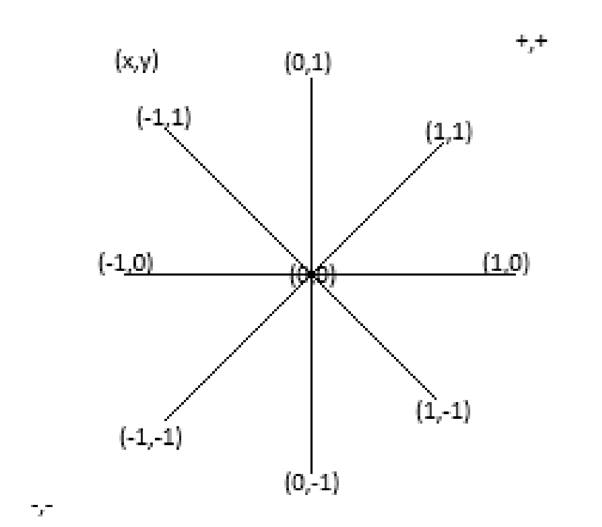
Mouse XY is a vector, (1,1) to (-1,-1), Every tick branch if MouseXY= PreviousPosition(Vector). If true then the mouse vector has stayed the same meaning the player mouse is travelling in a line (works for only 8 Directions, horizonal, vertical or diagonal). If false then the mouse has changed directions (Due to jitters, this is likely to trigger while the player is still drawing a line. We need to be able to able to account for this without disrupting direction change checks).
set PreviousPosition(Vector) as MouseXY.
MouseX & Mouse Y are floats, it’s not so linear that it’s 1, 0 or -1 for movement but it’s dependant on how much the mouse is moving in that direction as well, for instance if a mouse is moving slowly then the float will be roughly between 0.01 and 0.15, medium movement typically ranges between 0.2 and 0.6, fast movements can track that and go even up to 14.0. This can be used as weight.
Because MouseXY is a float, we cannot just use == to determine if the float has changed, other than greater or less than, we also have ‘Nearly Equal’ which checks if equals with a range of error tolerance. I overlooked this math a tiny bit and realised we only need to truncate.
0.28 seems to be the highest error of margian when drawing straight lines.
Direction should be a a truncated vector. I’ve lost sight a little about what I’m doing right now. I’ve been so caught up with floats, lets first try rounding mouse XY to keep as integers.
Tick: if (MouseXY != PrevPos) true: [direction changed], append PointArray].
Set PrevPos as MouseXY[Truncated]
Previous Pos starts at 0,0, once the mouse starts moving,
We could translate shapes into vector points? Make shapes up with vertical, diagonal and horizontal lines.
As a terrible brute-forced an inefficient solution to convert mouseXY into integers to base the math off of, I can use a ‘nearly equals’ to mitigate mouse jitters, round to convert to the nearest whole number (2, 1, 0, -1, -2) etc then clamp to limit the intergers to only 1, 0 and -1.

With this, we have a working solution for detecting direction changes. There’s definitely better ways to do this. There’s a lot of potential expressions for figuring out directions.
We can run this on a looping function with a timer that runs less frequently than a tick event which should drastically reduce load as well as precision required from the player.
After this, If we break down potential shapes into the direction required.
Say you have a square, it’s made up of the vectors [1,0 0,-1 -1,0 0,1].
Triangle will be [1,-1 -1,0, 1,1].
A diamond [1,-1 -1,-1, -1,1 1,1]
Lighting Bolt could be -1,1 1,1/1,0, -1,1.
At the end of the cast [Release], the points hit have to be checked, either the player’s sequence of points have to explicitly match the required shapes, or the shapes need a clever algorithm to check against the player points [match position with index order].
These are 8 possible movement directions depending on the 2DVector.
Unfortunately, shortly after this week I had switched focus to finding part time work to maintain myself financially so I didn’t get as involved with my project as I would have liked.
Week 9 – Saturday 8th March
I abandoned getting any project work done until now, Saturday 8th March 2025. I lost focus on my academic work to focus on finding part time work, as well as adjusting to balancing my work time hours & fatigue with the rest of my responsibilities. I let myself get heavily worked up over this unit as well as it’s the last university submission I’ll ever submit, and I’m pretty devastated I’ve let 2 months fly by already.
There’s 9 weeks left so time is really ticking to do what I can. Given that it’s been 2 months I’ve long broken my good habits and need to re-understand what it was I set out to do, for this I’ll look back over what I wrote so far as well as look at my inspirations again to see where my ideas came from.
For external portfolio project, I initially listed a few competitions and jams to participate in however it seems they’ve all gone by or are too close to accomplish much with if I started working on entries for them now. I believe the vertical and global game jams I took part in have demonstrated a nice chunk of my technical and creative abilities, such as the handful of core mechanics I was able to make within an evening to get a basic version of the game done in the vertical.
The main project is my diegetic wizard simulator ‘Way of the Wizard’ which features a series of ‘mini-games’ that are meant to simulate key activities that a wizard might do.
The main minigames I had in mind was combat, potion brewing, ingredient gathering and artifice.
- Artifice is a complimentary minigame about assembling & maintaining equipment such as staves and managing spells which is lowest priority as it’s the least planned and won’t add much to the gameplay loop.
- Ingredient gathering was intended to be a passive method for the player to acquire items through cultivating plants of their choosing, if I don’t have time to work this in by the end then the player will be given a supply of herbs from the start to brew potions with.
- Potion brewing is one activity I wanted to focus on more just because I felt like there was a lot of room for adding player interactivity to make it feel intuitive and diegetic.
- Combat is the main minigame where the player has to select a spell and draw symbols to cast spells which this fight was meant to be the showcase for the player’s work after preparing for the fight.
I want combat to be done first as it’s a key minigame. It’s a 1vs1 fight between two wizards where the goal is to land attacks on their opponent, first wizard to 0 hp loses. The player has to choose a spell, draw a symbol as perfectly as possible to cast their spell, the spell will then travel towards their opponent as a ‘delay’ before landing on the opponent providing a reaction time window.
Combat is in actual time rather than turn-based so both wizards can cast spells simultaneously and collide mid-travel where their damage values cancel each other out – this is one of the key mechanics in combat that will make fights more engaging by reacting to incoming spells, such as using weaker but more effective spells to counteract their effects.
One of the initial mechanics I wanted to use to add more depth to combat is an element system for the spells with strengths/weaknesses, like rock paper scissors and Pokemon where an element is either has NO effective 0x, less effective 0.5x, neutral 1x, effective 1.25x and very effective 1.5x against its target. For this we’ll need to establish what elements we’ll use in the game, this a pretty common system in video games based on what makes sense that it would deal more damage such as electric being strong against water as water is conductive of electricity, or water is strong against fire as water tends to extinguish flames, fire is strong against leaf because natural debris tends to be flammable evidenced by natural forest fires.
[These are ACTUALLY not scientifically accurate though as water is only conductive if it has ions in the form of impurities which makes distilled water an excellent insulator against electricity. Water is not always the best eliminator of fires due to differing fuel sources and while we have a good literal case of fire fighters using high amounts of water supplied through fire hydrants to douse house fires, fires are created from heat, oxygen and a fuel source, and the dousing method’s effectiveness depends on the fuel source, as a result fire extinguishers come in a variety of forms to tackle certain fires and in our case, water extinguishers are ONLY effective against fires from solid fuels, it may not only be ineffective but also worsen other fuel fires more specifically combustible metal fires and cooking oil fires. If we have a ‘magic’ fire who’s to say if water is going to be able to put it out?]. This feels like more attention to detail than necessary as this focus is on being LITERAL logic rather than the gameplay literal diegesis I wanted to focus on though it felt important still to touch upon.
The second topic on spells is types, the player needs to choose what spell they want to cast, spells need to be balanced between their damage, travel time and complexity. We could use a system were players choose an element separately and then choose HOW its applied/cast, for a numbers combat game like mine I think this could work choosing an element then an intensity where low intensity means less damage but simpler/faster cast and higher intensity means higher damage and more complex/slower cast.
We can make a unique shape for each intensity of spells with more details or a larger overall shape.
This does mean we have a bit of work cut out for me, I think FIRST we need to get a drawing symbol to cast system made where the player has to draw shapes and is graded on how well they’re drawn.
Week 12 – Monday 24th March
24Th March, 7 weeks left. Not the end of the world, it never is.
Getting back on track on my game, I need to understand what I’m making first.
I’m missing a bit of research into spellcasting mechanics in games,
Hogwarts Legacy(2023) was the most frequently point of research when discussing my idea with peers in regards to its spellcasting segment where a player must perform a ‘skillcheck’ in learning a spell once before being able to cast it freely. It’s a neat idea to make a skillcheck to learn a new ability as it makes the processes of learning something mechanically diegetic in the game.
During the skillcheck, the player must drag their mouse in the correct direction, similar to what I’m doing except the player must also time button presses to speed up their spell progress less they run out of time.
Game idea wanted to be in a few different parts, MAIN being the combat – Select a spell, draw a spell, spell travels, spell hit target, if target hp <= 0 then target is dead. WHILE alive, target also fires spells which travel and hit the player’s spells and player themselves.
Once the player holds down left click, they start ‘drawing a shape’, to guide the player this needs to be a pre-selected or pre-determined shape. From known examples before they normally show a transparent shape as a guide for the player to follow.
First, I need an initial method for drawing spells, first idea with David was to use the mouse’s movement vector of XY to determine the mouse’s movement direction and time spent moving to figure what shape the player has actually drawn, for instance if the player’s vector is 0,-1 for 1 second then we know they’ve drawn a line straight downwards.
If every time the player’s mouse movement vector changed we recorded the vector and duration between changes into a list then we can get an idea of what the player.
The downside is that the math is going to be incredibly finicky and need to be carefully planned, and with additional ideas like more accurate for spells for more power then I think it’s going to be a lot of work for a solution that is not adaptable.
I wanted to experiment with a more simply to set up method using meshes to test for linetrace collisions creating a visual guide in the process, the guide will be a ‘bigger blueprint’ made out a ‘segment’ blueprint that the mouse can collide with effectively making a mouse ‘tight rope’, these will effectively create a shape for the player to trace their mouse through. Mousing over each segment ‘primes’ it which will determine how much HP the spell has.
For each ‘segment’ they could have 3 planes to measure the player’s precision for tracing through the shape with the outer region giving the least points.
With this, we’ll have a master blueprint for the spell shapes being BP_SpellGuide and we’ll add segments as child actors, on beginplay we’ll get the number of child actors and save it as an integer ‘spell segments’, we’ll check if the spell is done by checking if the number of spells segments scanned is equal to the number of spell segments in the guide. [In hindsight, an alternative solution to track progress and check for the completion condition would have been to deduct 1 from the spell segments variable and check if it’s equal to 0 afterwards].
Segments have 4 layers, front to back we have the visual layer which is the only part the player will see which will light up when the segment has been ‘primed’, and the 3 layers behind are the collision layers for the segment where the thinnest part gives more points while the wider gives less. Primed is when the segment has been dragged over with the mouse, and the ‘spells power’ has been increased by which layer has been collided with. From front to back layers points are 3, 2 and 1 for spell power.
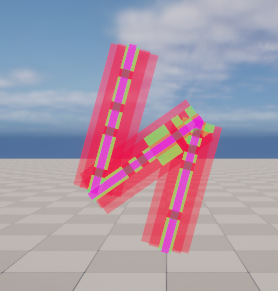
Here’s a prototype for the lightning spell.
This is an example of a less accurately drawn spell which would have a total power of 34
#
This perfectly cast spell will have a total power of 42.
The different elements are going to have a different shape each which may result in fewer/greater segments and therefore have higher or lower potential spell powers, to balance this we could take the current spell power divide it by the maximum potential spell power from how many segments are in the spell shape, and this will be our value for how well the player drew the spell. A better name I think I should have for the calculated value is ‘potential power’
A friend I shared the prototype with gave the immediately critique that it’d needs to be smoother, I could either nip this problem in the bud by making the segments shorter and increasing the number of segments in a given shape to make it smoother. I’ll want to bear this in mind for refinement later as well for how can I make the spellcasting look smoother, either by making the glow gradually appear rather than change the segment material in one frame.
Big downside is how horrific this looks in the editor, additionally we need to create line-traces more rapidly to the point where it may be worth tracking an interaction box to the player’s XY cursor.
This does make for a more interesting shape where the player cannot rush too quickly while casting, I don’t want to punish the player for dexterity in a minigame designed around being dexterous though a reasonable limit could be applied.
NEXT STEPS: calculate spell power from accumulated by total possible power.
Then, system for selecting a spell, and then aftermath of casting.
Tuesday 25th March 2025
First steps, calculating the potential power value to normalise spell power.

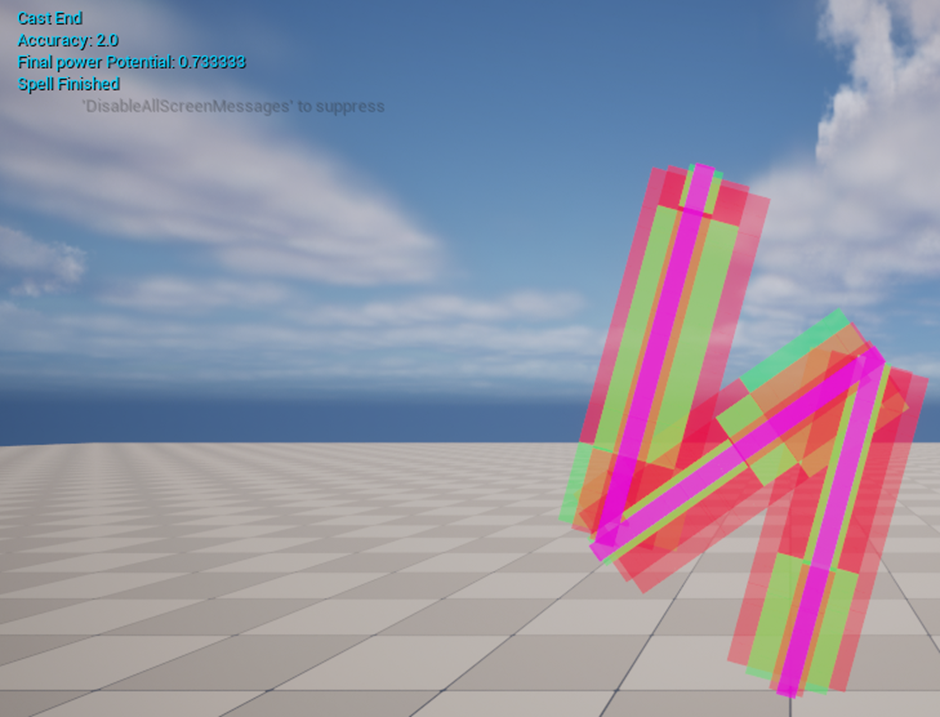
We get a float between 0-1, the spell is going to have its final power multiplied by this float.
I’ve also taken the liberty of setting up a little arena for the fights, a target dummy to be attack with a temporary healthbar to track damage.
This healthbar isn’t the easiest to see from far away, a more visible shot form far away will be much better
NEXT – CHOOSE SPELL WIDGET, CHOOSING SAID SPELL, SHOOTING ‘SPELLS’
Made a spell widget, selecting a spell now needs to create the guide. This will be a temporary placeholder for until we refine it later.
Each button will spawn in the exact guide a player need’s to complete to cast their spell.
For the projectiles, I’ve created a base projectile to travel towards the player/enemy, retain a ‘damage’ value and uses a new interface to react with either another projectile, enemy or player and deduct form their health accordingly.
To allow the player to re-cast spells, there’s now a button to re-open the spellbook.
Friends returning feedback on the spellcast system was to suggest what about a ‘3×3 grid like that of the samsung’s phones lock for the player to freely input spells to.
Another small system considered was a mana system to help balance what spells the player cast, with the intended element system on top of spells having different statistics I’ll have difficulty keeping the playing field even for spells. Adding a higher mana cost to objectively stronger spells will at least prevent the player from spamming strong spells too frequently.
Wednesday 26th March 25
Most of the work done so far was done without a proper taskboard like Trello just to get a starting sprint done. I’ve set a couple of today’s goals in a Trello.
Firstly, I’ve sorted out the enemy firing projectiles themselves and hitting the player.
Next I want spells to collide mid-air, negate damage.
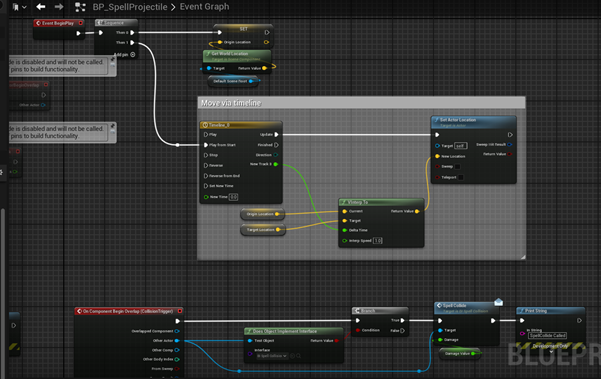
I’m using a blueprint interface to trigger interactions between spell projectiles, the enemy, the player and other spell projectiles.
While monitoring the health of the spells I realised I have no projectile cleanup, first I want a lifetime so they vanish no matter what and to be destroyed when they collide with the enemy or player.
I’ve added a blueprint interface function on the projectile blueprint that will be called when two projectiles collide, both as triggers and receiver’s their passed damage value with deduct from their health value and destroy them if health is equal or less than 0.
I also thought the collision interface function on the projectile blueprint was being triggered BY the enemy/player as the function was being called whenever the projectile hit the enemy/player which threw me off knowing the trigger only exists within the projectile blueprint. It turned out the projectiles were piling up inside the enemy/player blueprints. I need to destroy actor on collision here.
The solution I found was to feed an additional bool in after the spell_collide interface function is called, where if the hit actor’s class does not match the bp_spellprojectile then destroy actor is called.
Lastly I’ve actually hastily put together a spellguide blueprint for the water and earth spells.
09.04.25
Why am I so scared to get started.
I’m still struggling to find a routine for working, submission turning into a month away has shaken me into work mode, I failed to set any short-term deadlines for my work this unit so the actual submission deadline is the main one snapping me back into shape.
I’m lacking a GDD / Epic at the moment, so for the time being breaking down all my tasks into bullet points is helping keep quick track of what’s been done and what needs doing next.
For testing, I’ll add a debug-input to instantly cast a spell.
It’s been a moment since I’ve worked on this blueprint so I need a moment to recap how it works as well as look at my game feel with a fresh look.
Firstly, I’m reminded my game is based on being mechanically diegetic which includes UI, currently the spell menu is not diegetic as there’s a ui button to access it and a separate UI to select a spell, fortunately I studied diegetic user-interfaces in video games before for an essay in BSc2a. To make a diegetic spellbook menu and method to access it, I think moving the camera to a 3rd person perspective offset to the side could work, where the spellbook is slung on the player’s side and can be clicked upon to access, given an animation of the player pulling the spellbook out this would make it diegetic as the player character literally accesses the book. As for the menu, this could be a little trickier as we have to add more moving parts that could break – for the menu to be diegetic the menu has to exist in the game space physically and it has to fit in with the game’s world and context, or rather the theme.
There’s an abundance of diegetic menus in video games, such as the Forest’s inventory where the contents of their bag is spread out and displayed across the floor for them to select from, Metro Exodus has a physical map. I suppose the part I’m getting caught up is the fact that my combat is in third person perspective and the question is how do I want the player to select their spell while maintaining diegesis. Could it be that having the game in third person could be causing issues with diegesis for me as well by disconnecting the camera from the player actor? This is an important question I’d like to come back to. For my spell select, I’d like the camera to switch to the player perspective with an opened book where they can select a spell based on the page or image selected.
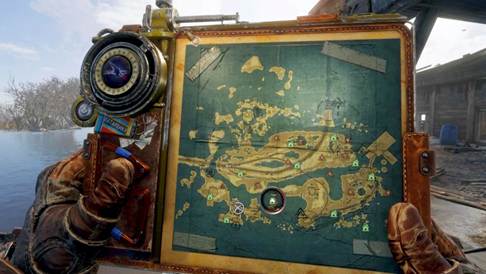
This has been added to my Trello task board under the to-do later section, made after my core minimal viable product goals are met.
Currently only one spell projectile exists, either I can make 4 child actors for each spell or just change the appearance of this one, they’re all designed to HIT the enemy spell then the enemy. I think I was lacking planning on the design for each spell too, they’re all ‘orbs’ at the moment which an occurring form of spells in a few contexts of wizards though fairly basic.
In the final product, I’d like spells to be a bit more visually pleasing with more refined forms, the lighting is a bolt that travels near instantly therefore giving no reaction time for counters at the cost of lower damage and higher mana costs.
Spells don’t currently plug in any unique damage modifiers at the moment.
How am I going to manage the different data for different spells? A data table might be the play for the values I want as it can contain all the information I want – the flaws of rushing this prototype was not planning for things like this.
Spell Data table has: spell name [string], cast guide [class], spell [class], basedamage [float], mana cost [float], travel time [float].
Ran out of time, it’s on the list. Only got debug done todayCas
Friday 11th April 2025 – 29 days remain
Implementing the data table, I have to double check if I have all the information I would like to use. We do have the spell name, guide and projectile references, damage, mana cost and travel time floats. To question how each variable will be used, name will be called when we cast a spell to announce what spell has been cast if not out loud in game then atleast in print strings for debugging and we can use this in switch on string functions as well, CastGuide will be our container for what guide class we spawn infront of the player to complete to cast their spell. SpellProjectile is a reference for what projectile class to create for said spell after the spell cast has been completed. Base damage will be the damage value of the spell and is multiplied by how effective the spell was cast and intensity selected. Manacost im adding early to avoid future issues, it’s a good implementation in my opinion so I see myself adding it later but I fear updating the structure will reset the data table. Travel time will be how long it takes for the projectile to reach the opponent. The simplest way to modify this seems to be feeding the travel time float into the ‘interpt speed’, it’ll work as a multiplier for how much the projectile will move rather than set the travel time so say the default travel time is 5 seconds and interp is set to 1, it’ll take 5 seconds but if change it to 2 then it will take 2.5 seconds. With the equation ‘Travel time = timeline length(5) / interp speed’ we can deduce how long we want each spell to take, eg lightning takes 0.5 travel speed, we go 5 / 0.5 = 10,
I’ve plugged the data table rows into the cast blueprint to add into the data for which spell is to be spawned and the spell’s final damage. A final print string tells us what we accomplished with this cast.

Need to add in spell travel time, strengths and weaknesses, and differentiate between the spells more eg different material, sound, model even?
Monday 14.04.25
I got carried away playing one of the games I was inspired by, Potionomics, a business, life and dating sim with many mechanics tied in to acquiring ingredients, brewing potions and either selling or using potions. From this at the very least I have in-depth knowledge of the game’s full gameplay loop.
Tuesday 15.04.25
Next up is the element system. I mocked up a diagram to illustrate strength and weakness relations between spells.
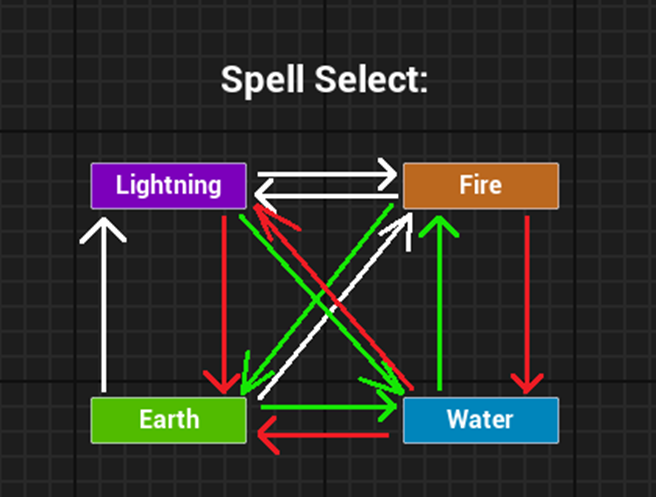
(Revision 3)
It took a few iterations but I found a basic damage vs resistance cycle I liked, which is simple, logical and balanced, although fire drew the short end of the stick in this one. It’s tricky to balance this sheet as I want to give each spell one thing that it’s strong against, but it’ll mean that one spell is weak against TWO spells.
Revision 4.
It’s hard to find a middle ground between what rationally makes sense as strong or weak against as well as keep the system balanced. There’s a bit too much to take in visually on revision 4, maybe one-way arrows would have worked better.
For spells that have more weaknesses than strengths, we can compensate for it by giving them greater base damage values! For revision 4, anything with 2x weaknesses I’ll give +25 health.
This is one little rough mockup tree for strengths and weaknesses, white is neutral (1x), green is strong against (1.5x) and red is weak against (0.5x).
I’ve made an enumerator to hold all the damage types
When spells receive damage, we can pass along the element enum with the inflicted damage type, using a switch we can use different select functions to get the final damage multiplier.
I realised I’m passing date table numbers individually rather than just passing through the data table row itself, I can set this on create_projectile as well as pass through the updated damage value as this is the base damage affected by the cast efficiency.

I’ve updated the actor spawns to use
I’ve added materials to visually differ the spells apart in battle, making it a little easier to gauge what interactions are going to happen during testing and so the player can visually tell the spells apart at least by colour.
I’ve set up a function to update the final value for damage inflicted by taking the inflicting spells passed damage and passing it through a switch with the damaged spell’s element and using a select with the inflicting spell’s damage element to get a multiplier for the damage. I’ve set up debug inputs to spawn each spell type to speed up testing.
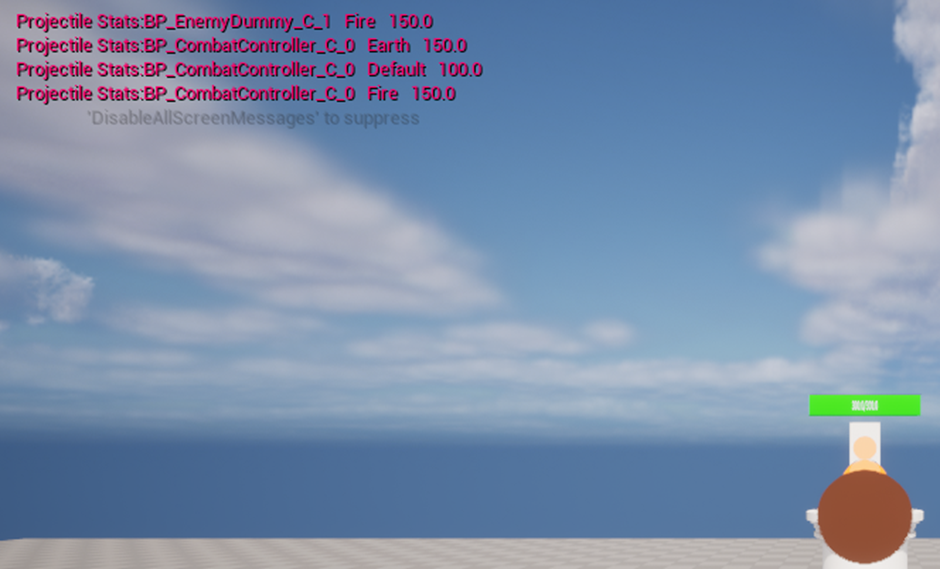
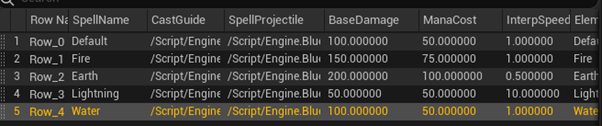
Now to test if these are actually working, I can calculate on paper what the final damage of the spell interactions should be before testing in engine if they actually match up.
For Lightning spells, the damage they should receive is: [Default:100, Lightning:50, Fire:225, Earth:300, Water:50] [Correct]
Fire [Default:100, Lightning:25, Fire:150, Earth:100, Water:150] [Correct]
Earth [Default:100, Lightning:25, Fire:225, Earth:200, Water:50] [Correct].
Water [Default: 100, Lightning:75, Fire:75, Earth:300, Water:100] [Correct]

I noticed I had an issue where there was enough time between spell collisions for the damage value of one spell to be updated before it was passed to the other spell. To elaborate, say Spell A and Spell B both do 50 damage, upon collision spell B receives damage first and takes 25 points damage, THEN spell A takes the damage value of spell B which is now the updated value of 25.
The spells are meant to take the original damage values before they’re updated. I’ve added a 0.5 second delay to fix this so the spells have a split second to pass over their original damage values before being updated.
Lightning[Default:100, Lightning:50, Fire:225, Earth:300, Water:50] [Correct]
Fire [Default:100, Lightning:25, Fire:150, Earth:100, Water:150] [Correct]
Earth [Default:100, Lightning:25, Fire:225, Earth:200, Water:50] [Correct]
Water [Default: 100, Lightning:75, Fire:75, Earth:300, Water:100] [Correct]
The math for the spells checks out, damage fed into spells is correctly being calculated through the damage strength & weakness system.
I’ve adjusted speeds slightly for the spells to be more balanced, lighting spells are slower while earth spells are faster.
Next I’ve added slow-motion for when the player is choosing and casting spells so the player has a chance to react to incoming spells.
This addition though has show another issue with my spellcast system, the rate at which the mouse linetraces for spell segments is also slowed, this was already slowed down to reduce load but I’ll have to increase the rate. I’ve added a check to test if there’s a guide active before bothering to start the linetrace check for segments.

I do reckon I could remove and add input mapping contexts when guides are active or not.
Next I want to try two different camera angles for the player.
Original player camera position is 370, 0, 387
I think I’d like to set the camera to first person when casting spells for a better perspective then third person between spell casts, giving the player a better angle for watching spells fly and land. We could either use two different cameras and active whichever one is needed or move between two positions, perhaps even use a timeline to move between the two positions for a smooth transition.
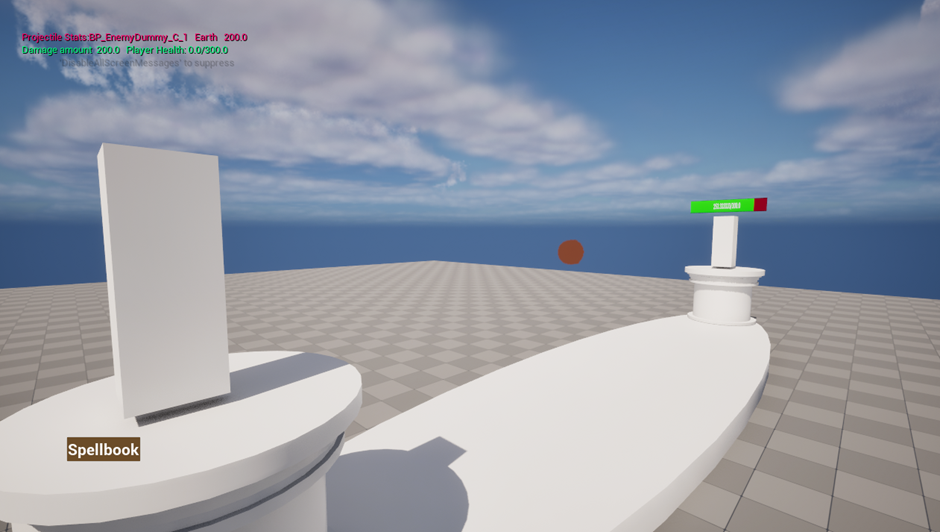
I’ve added a transform for two different camera angles, a first person and a third person perspective, third person is active by default and first person is entered while choosing and casting spells, with finishing the spell putting the player back in third person.
A great touch to this was adding a timeline to move the camera smoothly between perspectives, making it much less jarring.
Last touch I really want to make tonight is opening the spellbook through clicking on a physical book on the players waist. I’ve added a blueprint interface and a book actor, then added a child actor of the book to the player.

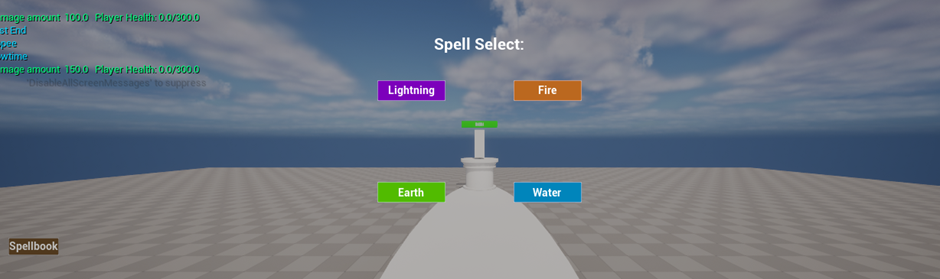
NEXT GOALS:
Time dilation triggers at the same timer as some animations, either delay the global dilation change by 0.2 seconds or add compensation floats for time dilation eg 1+globaldilation * 2
Open book infront of player (animation?) – Key visual feedback for the player, I need to display a book infront of the player alongside a diegetic interface.
Import characters? – Game is lacking visuals, imported assets and textures will aid this.
Custom meshes for spells – spell look wack, they need a little flair.
Diegetic measures for health? I want a diegetic way to display health, We could do this using the podiums as 3D healthbars. To make a healthbar diegetic it has to exist in the game space physically and make sense in the world, in wizard settings crystals are popular resources for challenging magic and I feel it could make sense having this big red crystals as gauges for health. Health is depicted as bright red and grows dark red as it depletes.
Better enemy spellcast logic? The AI tends to cast spells a bit slowly and haphazardly, we could have different difficulties that will change how the AI acts, such as being more responsive to player spells with counter spells.
To recap on diegetic UI design there are two conditions, is it in the game world and is it in the game story – neither is diegetic, just world is spatial, just story is meta and both is diegetic
Another key bit im overdue is a github page, I’ve finally set one up now that I have a foundation of a game to make.
Wednesday 16th April 2025 | 23-30 days left
A small detail I want to balance is the camera transition between first and third person view, due to slow motion or global time dilation being changed before the animation to first person plays. Either I need to find a way to normalise the values
30 looks normal at 0.2* speed or 6. At 1* speed it’s too fast.
We could get a normalised value.
2 – GTD = [1/1.8]. * 10 = [10/18]
I think the better solution is to just delay setting the time dilation by a second so the animation can play out.
Tuesday 22nd April 2025 | 17-24 days left
I finished my 4-day work week for easter and got carried away with another rest day.
To follow up on my last planned change, I added a small delay before the spellbook UI comes up so the camera animation has enough time to move into position before it’s both slowed down and before the player can visually inspect the book – the camera will of course need to be infront of the character model before the player can ‘see’ the book.
I’ve had another idea to add a bit of screen shake and vignette tint when the player takes damage, I think this will give the player a good bit of feedback for when they’ve been struck.
Slow motion research
I think there needs to be some sort of feedback for when time has slowed down as well since there’s little to indicate about this hidden mechanic.
For relative comparisons, GTA V(2013) has a unique character ability for Michael where time slows down while he can shoot in real time, while Franklin’s ability slows down time while driving. A prominent sound effect is played akin to sound ‘slowing down’ while a distorted low noise plays for the duration of slow motion. Visually the screen is heavily tinted either blue or green for the character’s ability, while driving the tail lights of the driven car leave a trail of red beams
SUPERHOT doesn’t use much in the way of visual feedback but sound audibly slows down with time, slow motion is a core mechanic as part of the game’s main selling point ‘time moves when you move’ so the player is well educated about this effect. It would seem I need to ensure the player is educated about the fact that time slows down while they’re casting spells, a visual que like darkening or tinting the screen will compliment this effect and some sort of tweak to the sounds been playing may be of great aid to the effect as well.
Using legacy camera shake I was able to add a screen shake that’s applied when the player is struck. I initially thought of adding different kinds of screenshake, eg powerful or high damage spells make the screen tremble.
Wednesday 23rd April 2025 16-23 days left BOO ANOTHER DAY GONE
Friday 25th April 2025 14-21 days left
My game is missing some other critical parts, I think a big part of clarity that’s missing is healthbar for measuring the player and enemies health values. How though do I create a diegetic healthbar? The key example is in Dead Space, the player’s health is measured by a bar on the player’s back, it’s diegetic because it exists within the game space (3D object on the player’s back) & exists in the game story (Sci-fi setting with more advanced technology). It’s an example mentioned time and time again but for good reason, it’s an effective application for a seamless and immersive interface. Even 2D elements are diegetic as they make sense in the game space as holographic projections from the player’s suit.
Dead Space’s healthbar itself is broken down into 4 segments akin to ‘health points’, and a point is taken off when damage is taken, despite not using any numbers it’s clear to the player how much health they have because the bar is visually marked with 3 lines to break it down.
I question how I will illustrate the player’s health value in my game, I have in mind a pillar placed near the player/enemy as a part of the stadium’s architecture which to simplify it is just a healthbar turned 3D and vertical as opposed to horizontal. My initial idea was for the bar to be like a glass tank of red fluid, but I think a red crystal would be more fitting for the magical fantasy setting as crystals are commonly found in this setting, either as ‘sources’ of magic or ‘conduits’ for channelling powers which is why they’re usually seen on the end of staves used to cast magic.
A particular question I have in mind is featuring numbers or not. In Pokémon games for instance, you can see the health bar of both your own and your enemies Pokémon however you can only see the exact numerical value of your Pokémon’s health. This makes it hard to gauge how well you’re fairing in a fight as you cannot gauge how much damage you’ve done in a fight, say your attack doesn’t do much damage at normal effectiveness, you can’t tell if because the enemy pokemon has a high-health value or a high-defence value – this makes the game much more reliant on player-knowledge about the vast pokemon and mechanics of the game.
I haven’t played for mechanics such as armour and damage resist, they could provide an interesting twist but it’s not a goal for the moment. It could be an interesting way to mix up battles if certain enemies used certain elements, they could be stronger or weaker to certain elements themselves and rely more on certain spells.

For comparison of using numerical values versus not, I look to Terraria which has some different style options, the game shows the numerical value by default with its individual heart styles however when the bar style is chosen the number is hidden making it harder to measure how much health the player has. I think this is much more impactful in Terraria where visibility of the health value is much more critical, the player’s health starts at 100 and can be increased to 500, and much greater in modded playthroughs, on top of this the player can quickly take lethal amounts of damage depending on the enemy and difficulty – because of this it’s important for the player to constantly monitor their health during fights and change strategies where while on high-health the player can forfeit some caution to focus on dealing damage while on low-health players will focus on kiting and evading until they may use a health potion again or simply flee.
The inability to accurately measure how much health the player can have negative side-effects on aspects like this, such as underestimating how much health is remaining or using health potions too early from overestimating how much damage they’ve taken so far. On top of this the bar recedes from left to right as opposed to the heart’s style of receding right to left, for most languages this can throw people off due to how we read left-to-right but as we depend on judging health by looking at the bar rather than the values it makes sense that we show the depleted health segments closest to the centre of the screen where combat is taking place, which is especially important during fast-paced boss fights.
Interestingly in comparison, mana is displayed as individual stars with no numerical value to display and depending on the weapon used can be depleted incredibly fast – as it’s depleted with the use of a weapon, the player is often too focused on the enemy’s movement and accurately landing attacks to pay much attention to how much their mana has been used. Rather than adapt the interface, the game allows the player to consume potions to recover mana with no cooldown apart from a reduction to damage for consuming too many too quickly.
The implementation of the interface must work effectively with the game’s style not only thematically but in terms of design as well.
I think for my game, health will need to be great enough to not deplete in less than 3 strikes to give the player room to strategize at the very least, I think the game is slow-paced enough to warrant displaying the player’s exact health value, having the number projected above the crystal as a ‘red-glow’ could work nicely in terms of theme. This effect would work similar to the ‘CRT’ screens I made in my global game jam project, the numbers on the screen had a vibrant glow, if I did something like that but with a font like runes it will fit the theme much more.
I’ll need a separate actor to work as the healthbar, im gonna call it BP_HealthPillar to be very literal and I like the name a lot. I’ll have a rough blockout for the pillar itself, for the segment of the pillar that represents the player’s health I’ll have a cylinder to represent the body of the gauge and I’ll use another to represent the health value. I want to try and make the health segment an ‘overlay’ where anything it covers is tinted red, so we can either scale or move this part when health is deducted, the uncovered part of the crystal should appear ‘drained’.
The other part I’m questioning is how to set up the bars, the bars will need to update based on its parents health and max health values, these bars shouldn’t retain their own float values and should instead use a function that inputs these two floats instead, which can be called by its parents when they take damage or heal instead. To setup these health pillars, I should establish a spawnpoint for them and create them when the player/enemy spawns in and create a reference to them from there?
Altering the Z scale of the bar could work but it’ll shrink to its centre point, the centre of the bar will need to be at the base of the pillar so the bar will ‘shrink’ to that point which means it’ll need to be twice as tall which as a very small cost to the engine – we could then calculate the bar size by diving health by max health, multiplying the original Z value by this and setting the bar’s Z scale by this.
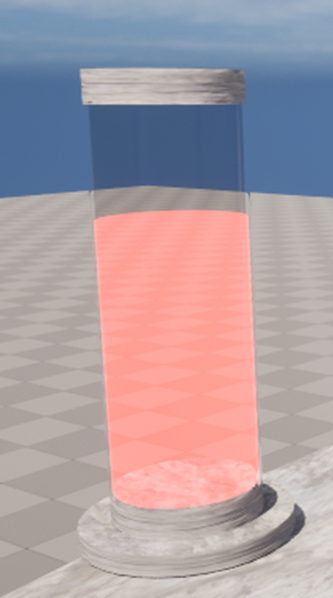
I had a shot at mocking up the gauge version I had in mind, where the pillar is more akin to a giant thermometer style gauge for the healthbar, but I think the crystal style will suit it much more.
It’s set up as planned with no issues, though I would really like to have that small detail where once damage is taken, the section of the health bar to be deducted changes colour before being deducted, allowing the player to see a better measure of how much health was lost, this will be the ‘damagechip’. Another shape will need to be added to the pillar. It’ll be much harder to calculate this on a 3D healthbar but with the side-perspective in viewport I can see the exact dimensions I need to calculate how big the chip will need to be. The Z height will range between 40 and 400, max 360. We can get the position with the originally calculated health value. The thickness will also be proportional to the amount of damage taken, we’ll need to input the damage taken through our update healthpillar function, we can get a multiplier from diving damage by max health then multiply the maximum scale by this, which is 3.6.
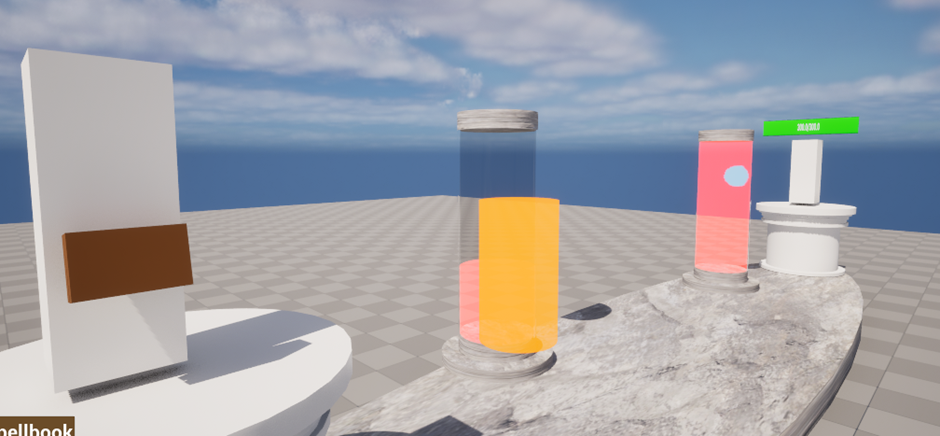
The Z location isn’t quite right, I think there needs to be an additional offset calculated by the damage dealt. For 50 damage spells the numbers are dead on
Anything else though and the scale is off.
Checking back over the on the bars, the health bar Z location is 20. How do I offset these values by the right amount?
Max height is 360 / scale 3.6 * 100. Its location is being set to the top of the health bar so of course it’s going to intersect with it, I need to calculate the chip’s height and add that to the z location. It’s height will be its scale * 50
It took a moment to figure out but it’s working perfectly now. I was missing an offset to the Z location that needed to be half of the chip’s height or scale*50.
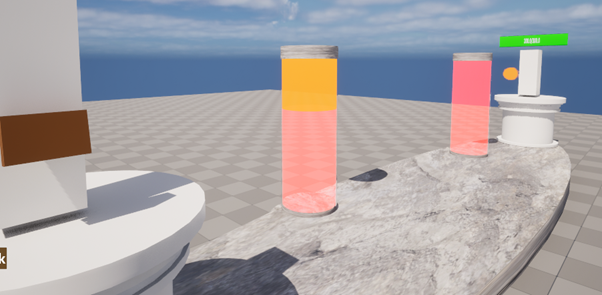
I would like the bar to smoothly deplete, the chip masks the healthbar jolting down but I need the chip to smoothly vanish, either shrink on timeline or decrease alpha.
28.04.25
Next, I’m adding the glow-text above the pillars to display exact health values as I think it’ll be better for gameplay to see actual values.
I’ve done something similar before with 2 point lights in the global game jam earlier this year.

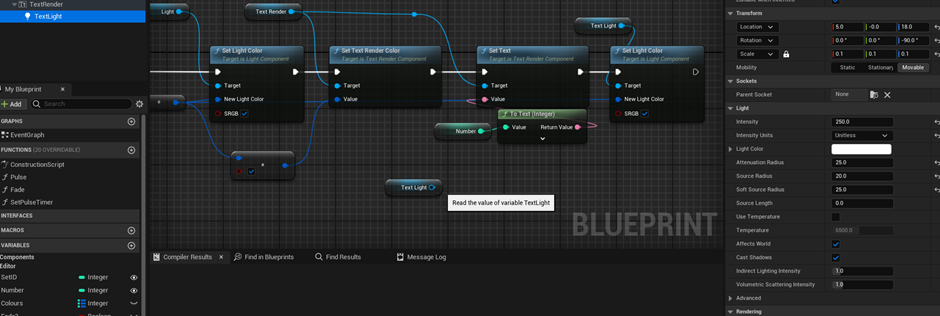
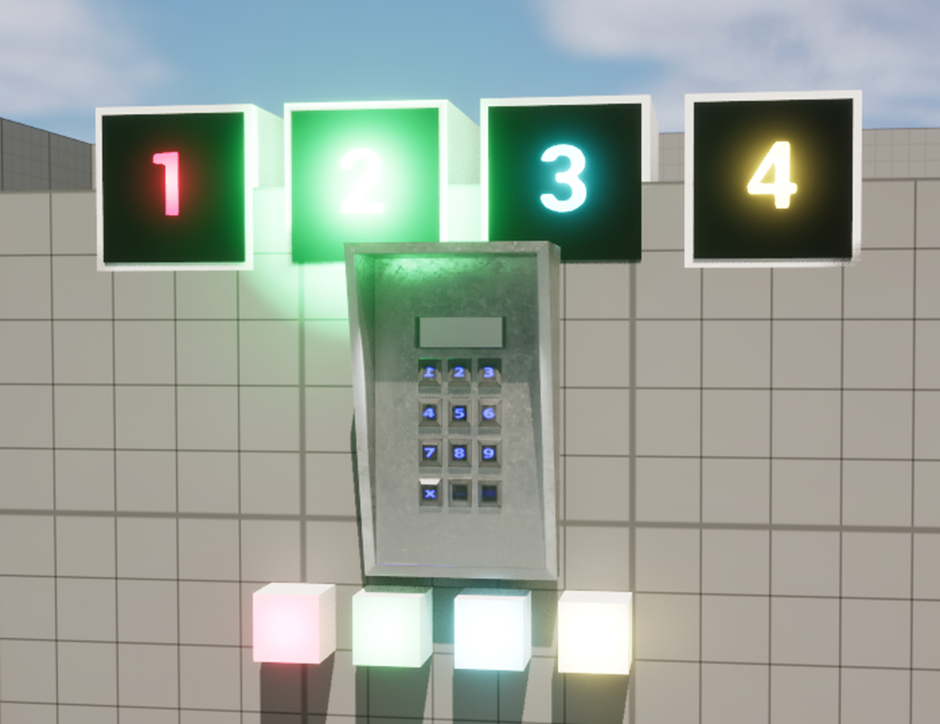
In this example, to achieve a glow effect I need to place a light directly onto the text.
Using my previous example as a reference, I need to copy the ‘TextLight’ component.

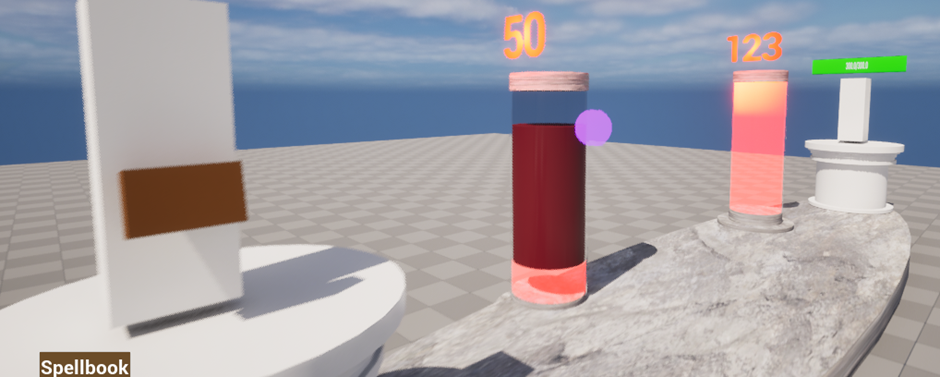
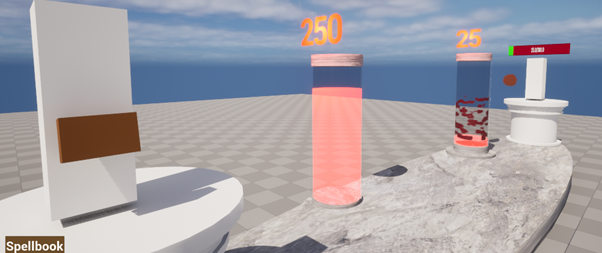
One problem I found was customising the pillar text, my custom font didn’t work and any materials I used didn’t work either.
We’ve got our diegetic features now, so we can get rid of the placeholder healthbar and UI.
Part of the trouble disconnecting the UI blueprints was some other blueprints relying on calls through it. One thing I needed to adjust was how spell guides were spawned, where the class was chosen through a select it removed the ability to set any default values on spawn, instead I’ll have to use a switch instead which will be a little uglier but it’ll work. It’s now been replugged to work. I’d really like to get more visual.
Key part I’m also missing is starting and ending, I need combat to stop when the player or enemy is dead.
The next element that doesn’t fit the game setting is the spell selection, I want it to look like an actual spellbook with icons and writing for each spell, each section functioning as the ‘button’ for the described spell.
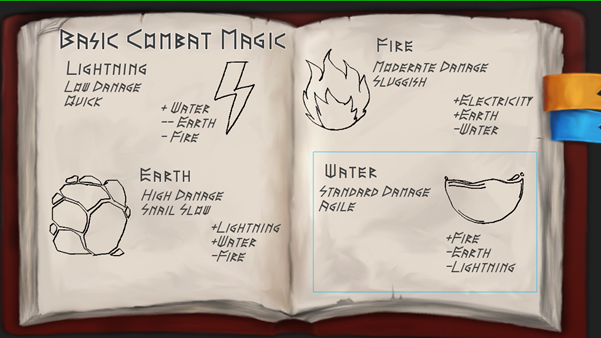
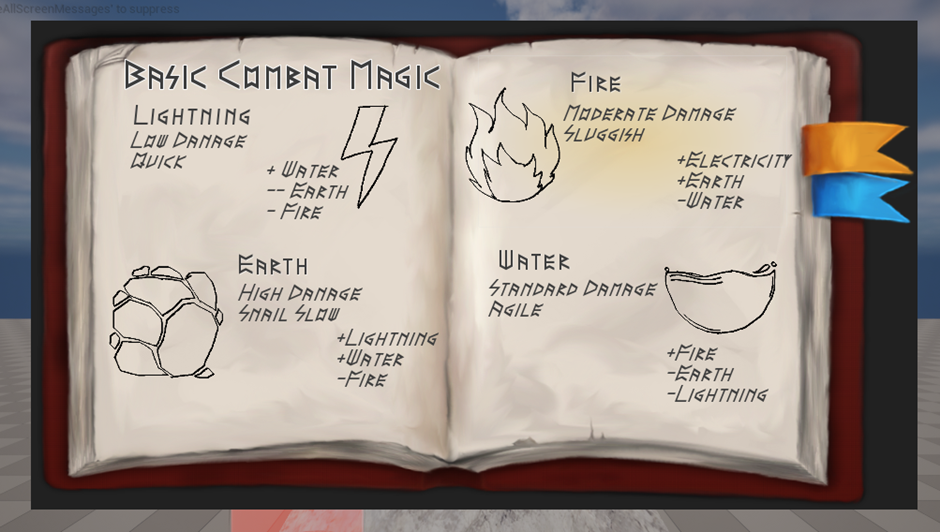
Three apparent issues with the first attempt, text is a bit too clean for how rugged the page looks, dev art looks rough, and UI being attached to the viewport over gamespace breaks diegesis immersion.
A small bit of feedback that kept eating away at me during tests was lack of transparency over how much damage was dealt, I’d like to attach text to the front of the health pillars damage chips to illustrate how much health was also lost.
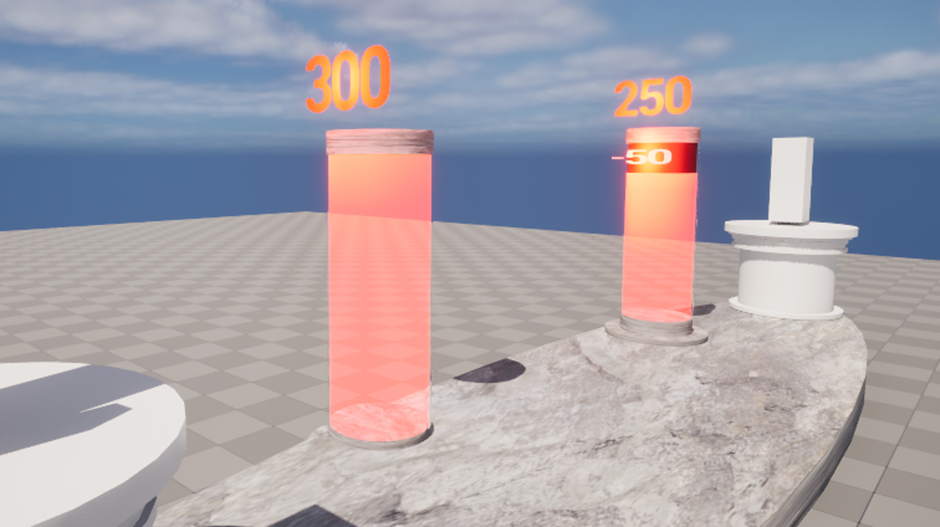
I like the addition, though the default text and scaling being off is quite jarring, updating the world scale of the text to 1 each time the damage chip updates fixes this.

I want to provide some form of feedback when spells collide as to how much health they have. I think basing the scale on health would be an excellent way to illustrate this value with no ui elements.
I feel this is a good effect to illustrate the health value of spells this way, though it’s not the clearest it’s still a showcase of what damage is going to be inflicted.
Next step I wanted to apply was
The UI could do with a little more refining but it’s a really good start, the game feels much more immersive harsh graphics aside.
I next want to work on the casting mechanic, the cast guides could do with more lee-way and forgiveness for the player, and be simpler to cast based on the spell.
I also want to add the 3 strength options for each spell that work as a spell ‘difficulty’, higher difficulty spells have more segments to cross over meaning more time and caution is needed to complete the cast in exchange for more damage.
Thinking back to spellcast accuracy, I think it makes sense that the enemy should also be prone to a similar modifier. The player isn’t always going to
I had a mild panic upon trying to commit my changes, upon finishing my commit’s description I realised the commit button was greyed out, then noticed no changes had been made, and upon opening the project files I then found none of my work in the past few days had saved. Panic ensued before realising that I had made a copy of my project to upload to github, and mistakenly opened the old backup to work from. Simple solution as this is solo project was to just upload the files i worked from as a new github repo.
29.04.25
Careers development plan segment:
Looking over Ian’s shared job postings for requirements would be an excellent reminder of the skills and experience companies are looking for. These are the rungs that I need to reach rather than aimlessly work away and random tasks, I need to restructure what I want to actually learn.
Go through VLE Masterclass.
Creator of dwarf fortress gave a talk 4 weeks ago.
Trine example – Player’s draw on screen to create shapes to solve puzzles.
Custom text on actors has to be turned into materials,
Cast solutions:
- Mask volumes,
- Spline
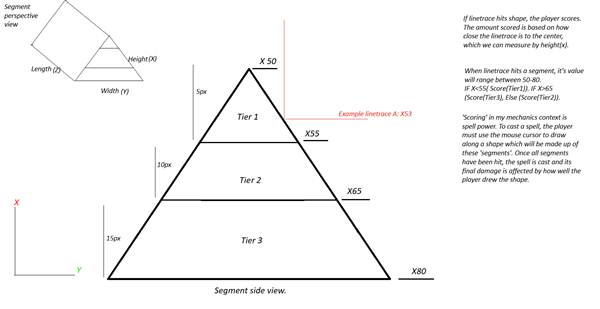
Splines are one effective solution at creating a clean, smooth shape for the spellcasting system. Another alternative method for judging spellcast accuracy is using the depth axis, if we use a shape like a triangle/trapezium or cylinder we’ll get an angles surface.
(Gyazo turns images to links, could save room).
This should be a relatively efficient solution with 2 simple if conditions, for whether the hit location X is lesser or greater than the tier 2 zone.
Another glaring issue I spotted with the original segment system is due to the gap between each layer and perspective of the player, the segment layers become askew appearing closer to the centre of the screen.
The distance between the visible layer and the farthest back layer was 6, enough to cause enough distortion from the perspective to appear askew. Reducing the gaps to a total 1.5 pixels gap has amended the issue.
This issue, despite planning to move onto a new system, was worth the quick investigation as it’s a fallback in case the new method works, and if I was having an issue with perspective with the old system then I would have had the same issue with the new system.
Bearing this issue in mind, I’ll need to make the new triangle segments much thinner than the planned 30x which was ballpark figure anyway. The height ratios for each zone was 1:2:3, with 1.5 the revised measurements will be 1.5, 1.25, 0.75 and 0. My time calculating potion ratios in Potionomics came in very handy here.
So, effectively I’m replacing the BP_SpellSegment, an actor of 4 planes, with a 3D triangle.
I feel I’m overplanning and overcomplicating this rather than just trying the spline.
TO DO NEXT: SPLINE
TRELLO : MUST, SHOULD, COULD, WOULD SYSTEM. HIGHLIGHT BASED ON TASK STATUS.
30.04.25
Looking at what you can create with splines, I think these can work perfectly for creating much more smooth and consistent shapes for the spells.
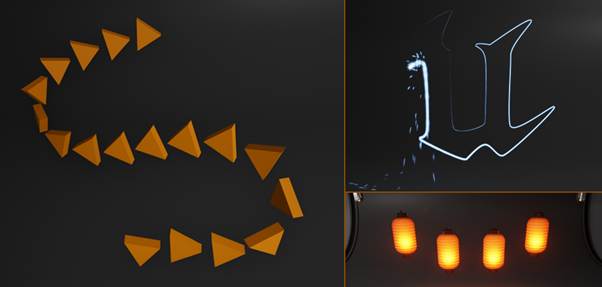
Judging by the documentation examples specifically the unreal engine icon, we should be able to create precise shapes for the casting mechanic, it’s infact a perfect illustration for what I’m aiming to achieve with the glowing line gradually completing the shape. Splines from what I see are highly effective at creating actors along a path. Either equal distance like a string of lanterns or seamlessly conjoining a series of shapes like a fence or road.
Looking at the documentation, there’s also an event I overlooked which was ‘cursor over’ which is an input method built into unreal engine, I could have used this instead of using line-traces which currently are created multiple times a second during spellcast segments which also have a delay, if the player moves the cursor too fast then player may potentially mouse over a segment fast enough to miss the game registering a hit.
Line traces are currently used get the hit actor, check if it has the right interface, and calls the interface function which passes through the hit actor from the linetrace.
With the intended plan of using the hit location X for checking cast guide accuracy, I’d have to still use linetraces, I believe both linetraces and mouse overs can still be used, where a linetrace is made once when a mouse over event occurs.
The shape I plan to use is the starter content wedge.
The splines are quite fiddly, it’s tricky to get a perfect shape with deforming or creating awkward kinks in the shape.
I’ve also only been able to create shapes with the spline in the level rather than blueprint, if I can’t create unique spline shapes within the blueprint editor itself I’ll have to rethink how I’m handling spell.
Rather than creating and destroying spell guides on demand, I’ll need to place the variations in the level beforehand hidden beneath the ground and move them in the right position when needed as well as reset their values.
The step is implementing a method for the mouse to hit components of the spline and gradually fill the shape. I’ve had a shot at using mouse-over, however I failed to realise these only work as events where each component would need its own mouse over event which I can’t do for splines, so it would appear I need to line-traces after all. I still intend to use mouse-over events for interactables to toggle highlight effects with begin/end events.
Line-traces works perfectly with hitting individual spline components that we can pass through functions and change settings of.
After a segment is hit, we can disable collision, incremenet.
I should be able to have a single blueprint for the new spell casting system.
We’ll need to do some things differently with this iteration of the guides, for instance we want to store each segment added in an array for us to call back to later when we reset the guides. Rather than use begin-play and on destroy events for the start and end functions of the guide we’ll need to call these in custom events called when the actor is ready.
StartGuide will need to activate the actor, move it into position and lower global time dilation. EndGuide will need to deactivate the actor, hide it and reset global time dilation.
443 0 353
Fire – 442 -13 366
-180, -90, 180
0.075
An additional hurdle is how I’m going to reference the guides from spell select, originally with them being destroyed there was no need to retain a way to reference back to them. As they’re pre-placed within the level editor I can either manually set them as references, or I can use ‘get all actors of class’ with an index value for each guide. The game controller is not pre-placed within the editor so I can’t manually set up references for it, I either need to place another actor within the level as ‘guidemanager’ to hold the references and we can use ‘get actor of class’ to create a reference to it from the controller.
Top down view also proved useful for having a perfect view of the symbols while creating them
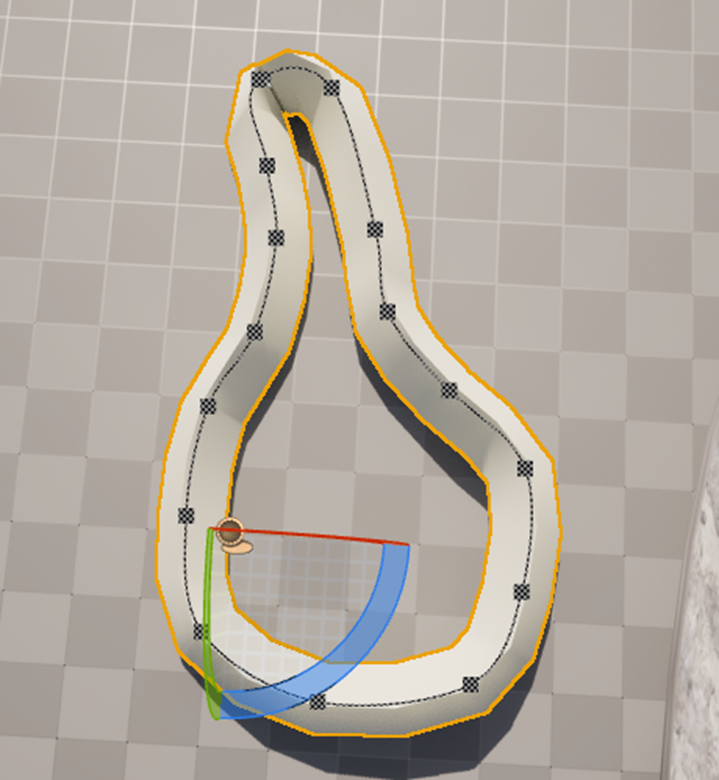
There are some slight inconsistencies such as the fire guide tracks having 17 segments but on a full cast only 16 are hit. I set up the blueprint to get all spline segments and set the ‘segment variable’ on beginplay by this, everytime the player draws over a segment a ‘progress’ integer is incremented by 1 and compared to the total number of segments, when these 2 values are the same the cast would be complete. I think I’m best off manually setting these values for the time as I’m already pre-placing the actors within the scene and know how many segments each one will actually have through print string tests.
Total segments actually used in each shape: Fire: 16, lightning:12,Earth:24,Water:17.
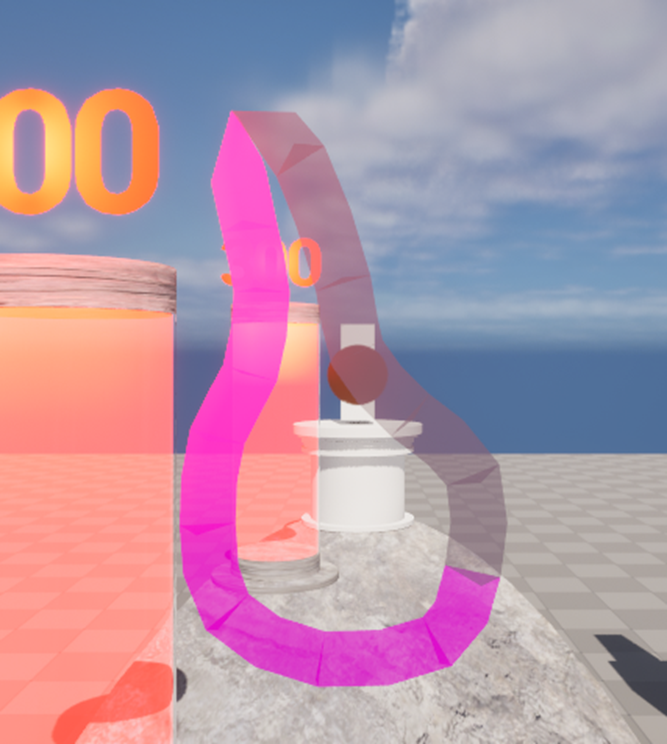
I’m pretty happy with how this turned out.
I threw together a vignette in photoshop, the dissolve mode on the gradient tool made it quite messy and pixelated, combined with faint application of gaussian blur filter it created a rather dirty looking lens which I felt was a fitting damage indicator for someone who just hit in the face with a spell. This fits much better for earth, to make damage a little more diegetic I could use a custom effect for each spell used such as a matching colour tint on the screen.
I made a new widget to retain all screen effects, which is attached to the player viewport. This raises a question if it’s diegetic. The vignette acts as a visual stun alongside the camera shake on hit, it’s meant to simulate that disorientation and shoch that occurs when one is struck.
07.05.25 notes:
Name change from way of the wizard to runes of engagement
Change mouse cursor to a wizard arm
For a quick iteration of the brewing minigame:
BP_Ingredient is a pawn for items that can be picked up and placed in a cauldron. They draw from a data table of ingredient data, such as name, mesh and other values according to what the item does for the plant.
I want for dev prototype sake to atleast prototype the cauldron segment
To-do: test for spell accuracy, setup communication method for spell guides to game controller.
Potion brewing idea:
I ought to make a simple system.
?Herb storage? Divide based on type.
How would the system work? Catalyst determines potion type Restorative[Health/Mana/Cooldown] | Resistance[Reduce damage from X element] | Offensive [Used against enemy:
Wall, Block X damage from next spell?
Slow down enemy cast speed
Increase damage of next spell by 1.2
Blind enemy [Can’t see what spell the player is firing]
2nd herb decides the [effect], using more will make the potion stronger at a cost of either capacity, cooldown / usage limit. How do games balance potion usage?
I first looked back to Terraria again which features a limitation on consumption of health and mana potions, health potions have a cooldown of 60 seconds which can be reduced based on the healing item, each consumption of a mana potion inflicts 5 seconds of mana sickness additively which reduces damage based on the debuff’s duration. Reduction multiplier = 0.25 * (debuff duration[in ticks] / 300).
The Witcher 3: Wild Hunt features a potion system where the player has a large assortment of potions to use for many different effects, greatly stacking the odds in the player’s favour when used in the right scenario, to prevent the player from consuming too many potions each potion has a toxicity value which can’t exceed 100.
Limiting potion consumption via cooldowns will prevent overconsumption, though how will I convey this to the player? A *hiccup* sound effect and bubbles portrayed above the player would be a fitting way to display this detail, overconsumption of beverages especially alcohol used to be portrayed heavily in media with hiccups and bubbles, we can colour code the bubbles to match the potion that’s been overconsumed too.
How will the player access the potions dietetically? I have in mind giving the player a bandolier to hold their potions, player selects a limited inventory of potions to bring to a fight beforehand and they can use one by clicking on the desired potion on the player’s back. I trialled a mechanic like this before so it would be quick to reproduce, This is however a large chunk of content to produce so close to the deadline.
Having a bandolier as an active inventory
Herb inspirations: Terraria, Potioncraft, Potionomics, Witcher, Minecraft.
Terraria has the most basic crafting system for potions where the player can instantly craft any potion while near a viable crafting station as long as they have enough ingredients in the form of a water bottle, herb(s) and other materials such as iron ore, cactus or mana stars.
Witcher 3 is second to this though potions are permanent unlocks which are restored when the player ‘meditates’, to compensate there is a more advanced system of many materials that must be foraged, bought or crafted to acquire these game-changing potions. The player must create dwarven sprit, alcohest and white gull as ‘catalysts’ for potions, with alcohest being required to create ‘Enhanced’ potions and while gull being required to create ‘Superior’ potions. Basic to Enhanced potions only require a few ingredients, but for Superior potions the player will find themselves needing higher quantities of a greater list including advanced alchemy ingredients such as Vitriol which requires white gull and half a dozen other items to create.
Higher tier potions will have more effects, stronger effects, longer durations and have more charges between meditations.
Potioncraft has a unique system for creating potions where the player is shown a map with its potion in the middle, each ingredient retains a unique path that it applies to the potion when added to the cauldron, stirring the cauldron will move the potion along its provided path. Water may be added to ‘dilute’ the potion moving it incrementally to the centre as water is added, around the map are small potion icons that retain the many different effects such as fire, frost, swiftness and invisibility to name a few, when the player’s potion is overlapping an effect it’ll be tagged with either 1 2 or 3 depending on how offset the potion is from the effect icon and pumping the bellows beneath the cauldron will add this effect to the potion.
Potionomics has an excellent system in place that works in conjunction with its progression throughout the game. Ingredients contain ‘mutagens’ which are coded A-F and potions are created by achieving certain ratios of these mutagens. Each ingredient contains a unique combination of magimins, where progressing unlocks ingredients with higher quantities and more round numbers of each mutagen such as the Slapping Turtle Shell with 20A and 20B, perfect for health potions which require a ratio of 1:1 AB.
Potions are given one of 6 tiers Minor, Common, Greater, Grand, Superior and Masterwork alongside a subdivision between 0-5 stars based on how many magimins were used in the potion, this determines its base potion value. Depending on how close the magimins ratio is, the potion may receive a bonus of 2 stars with a chance for a third, down to a chance of losing a star, giving the player leeway on how they want to approach potion brewing such as chancing a lower quality potion when they’re short on certain ingredients or even a hail Mary approach of adding high-magimin ingredients to skyrocket the quality.
Ingredients may also give the potion a good or bad effect depending on the item, this effect being one of the 5 senses being Taste, Sensation, Aroma, Visual and Sound with each affecting the potion value by 5%.
The quality of the potion the player may create is limited by the progression; the player’s cauldrons have a limited number of items that can be added as well as a limit on the number of magimins added, after each showdown the player is given access to more ingredients and cauldrons which allows them to make higher quality potions which becomes the moving goalpost as the player must brew the highest value potion of 3 specific types for each showdown every 10 in-game days.
The methodology of programming each style of potion brewing is vastly different in each game application. Terraria shows all recipes that the player meets the criteria to craft, we could assume each recipe is a list of item names alongside the necessary crafting station and all are displayed when the player opens their inventory, it first might retain a list of all the crafting stations within range of the player, and opening the inventory could check against all the crafting recipe lists based on each crafting table, for instance we have furnace that has recipes for glass, glass bottles and the many metal bars made from various ores, on the other hand potion stations retain the recipes for all the potions the player may brew.
Witcher 3’s crafting system displays all known recipes in a scrollable list, and each listing shows the recipe item information as well as if the player has enough ingredients, eg 9/2 Honeysuckle. The screen gradually becomes slower to load as the player amasses more recipes and ingredients, leading me to believe that every recipe is added to the crafting display on load alongside checking the player’s inventory for the requisite items on every instance – I’m lead to believe these styles of crafting are intensive on the game though I’m assuming a very basic and inefficient method of checking for recipes, this crafting style isn’t relevant however so further resources spent researching would be wasted.
PotionCraft requires no crafting algorithm for its brewing system as potion effects are added by moving a marker around on a map to certain points and confirming its addition to the potion by pressing bellows.
Potionomics is slightly more interesting to gauge, ingredients are added to the cauldron to create a total sum of ‘magimins’ which equate to six float values labelled A, B, C, D, E and F.
There are 20 different potions in the game made by meeting a certain ratio of magimins, the recipe would be simple as it would be based on the ratio for instance fire tonic A:1, C:1 or Alertness Enhancer B:3,C:4,D:3.
Each potion type follows a different magimin ratio, basic potions and tonics are 1:1, enhancers are 4:3:3 and cures are 1:1:2. The game is able to identity the closest to perfect potion being made when each ingredient is added.
EG Fire tonic is A:1, C:1.
Cauldron has A:45, C:43 for a total of 88.
We can calculate how many magimins of a certain type should be a potion, say we have 200 magimins in a potion to make a fire tonic, in a 1:1 ratio we add the points together of 1+1=2, we divide the magimin count by the point total which gives us 100. For a more advanced potion like B:3,C:4,D:3 we get 10, 200/10 = 20, B:3*20=60,
I think it makes sense that the game would break down the current cauldron contents into a comparable ratio itself,
I have an example of petrification cure A:1, C:2, E:1 and my cauldron has 260 magimins as A:66,C:22,E:66, each /260 = 0.253, 0.429, 0.253. There’s a different way to express ratios when it comes to fractions of a total being decimal places, we can represent the cure recipe instead as A:0.25, C:0.50, E:0.25 with margin for error being the potion stability rating. I theorise the game may run through all the relevant recipes based on the magimins present, and whichever recipe has the highest balance of magimins aka the closest to perfect ratio is returned for the player’s potion.
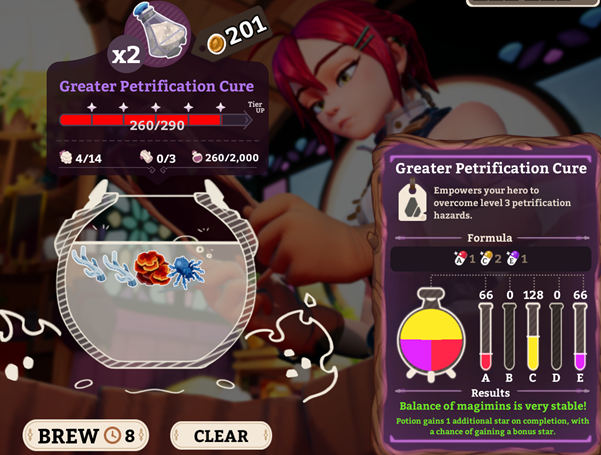

I think for my application, I’m going to make a simple crafting system through the cauldron, the player is provided with a guide on what ingredients make what potions, the cauldron will retain its own ‘inventory’ of ingredients that the player adds and when the potion is ‘finished’ it can check against the recipes available to determine what the player has made.
The player’s inventory will be ingredients pre-placed in a pigeon-hole style shelf, the player can walk up and ‘interact’ with an item to grab it (Hold LMB) (half-life 2 style where it’s held in front of the player, I want to update its location to stay in front of the player and drop by releasing LMG.
I want to add elements like stirring the cauldron and pressing bellows to brew the potion, maybe even plunge a bottle inside the cauldron to bottle the potions.
I’ve set up a first person prototype just to test this out, I want to test a system where I can ‘pick up’ items where they will be attached to the player’s hand. There’s two ways to do this where I can destroy/hide outside the map holdable objects and copy its static mesh to a ‘decoy’ in the players hand, when the object is ‘released’ the real one is spawned/returned to the position infront of the player. The other way is when we ‘hold’ an item infront of the player its position is updated every tick which is going to require direct communication between both actors being the player and the held item in order to get the location of one and update the location of another every tick. I want to achieve a system of holding items similar to valve titles like Half-Life 2 and Portal 2 which I think have the best effect.
My grab works as a collision box attached to the player camera, it has a for loop with break that runs through all overlapped actors, and the loop body checks if it implements the BPI_Interact before casting to bp_ingredient. Any successful interactions breaks the loop.
To create the grab effect, I decided to use a cast to get an actor reference for BP_Ingredient to store, with it stored we can call two functions which prepare the actor for being grabbed and dropped, and we can use it to set the actor’s location every tick. We’re also going to update the actor location every tick to make carrying as smooth as possible, with tick only being active when left mouse button is held down.
For communicating recipes, I think these will be best stored as name arrays where we can check the first.
Buckthorn
Catalyst determines potion type Restorative[Health/Mana/Cooldown] | Resistance[Reduce damage from X element] | Offensive [Used against enemy:
Wall, Block X damage from next spell?
Slow down enemy cast speed
Increase damage of next spell by 1.2
Blind enemy [Can’t see what spell the player is firing]
We need herbs associated with elements, I’m going by some classic herb names for each element such as: Firebloom, frostmint, stonecap, shockthorn, heartdew, manabulb.
Catalysts need to be something that stands out from the herbs, maybe a ground powder or small mineral which each recipe requires only one of. Sunpowder, quartz dust and starsand.
Restoration is unique in having 2 separate ingredients
Resistance is applying elements to the player themselves and offensive is applying elements to the enemy or battlefield.
| (Restorative) Sunpowder | (Resistance) Quartz Dust | (Offensive) Star Sand | |
| Firebloom | Buff damage by 1.2x (60s) | Fire resist | |
| Frostmint | Water resist | Slow enemy cast speed | |
| StoneCap | Small damage reduction | Earth resist | Block next spell |
| ShockThorn | Time to cast is even slower | Lightning resist | Blind enemy |
| HeartDew | Heal | ||
| ManaBulb | Restore mana | Slightly reduced mana consumption |
I’ve made an enumerator for potion ingredient names to keep a consistent library of names, I’ve made a structure and table for the ingredients themselves and for the recipes.
Question is how do I plan to check what recipe the potion creates? I think the first and most basic solution may be to use a for loop to check if the first item in the potion contents array matches the first ingredient required in a recipe before checking if the second ingredient matches, true breaks the loop and returns the potion otherwise it will continue. If no potion is returned then the brew fails.
I’m starting to run into some issues with adding items to the cauldron with the current hold system. Due to the way I tried to set up holding items, I didn’t want to destroy ingredients as then the character’s reference to the item will no longer be valid, I can either add an ‘is-valid’ condition check which is less than ideal as we want as few things running on a tick event as possible, or add a way to disable the character’s tick event from ingredient to cauldron interactions.
While debugging this, I realised I had missed attaching the item transform point to the camera instead of the capsule, attaching it keeps the item within the players view, much alike the placeholder arms
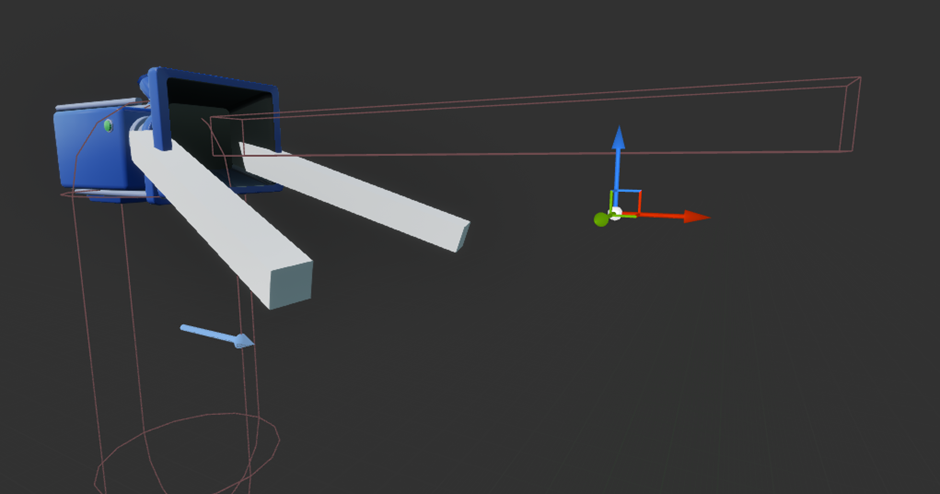
I need a method to disable tick events on the player when items are added to the cauldron, in this case I can make a reference to the player from the cauldron and when an ingredient is added I can disable tick events allowing me to safely destroy BP_Ingredient actors without causing errors.
I wanted to add an interactable by the cauldron that the player needs to interact with to finalise the potion, I’ve added bellows beneath the cauldron that the player has to touch to finalise the potion, this will work as the trigger for the potion recipe
I next want to add scooping potions into the cauldron and out as ‘finalising’ the process for making potions, for this I need to give the player the ability to grab both ingredients and bottles. This comes with some extra hurdles such as changing ‘Held-ingredient’ variable on the character from a BP_ingredient reference to an actor reference so we can hold different actors, however I won’t be able to call the grab and release functions on the bp_ingredient if I do this. As these functions are needed on both potions and ingredients, I can make a new blueprint interface for grabbable items that can hold both these functions. After setting this BPIs up, I’ve had a little hindsight that this could have been a master ‘grabbable’ object actor with potion and ingredients as child actors to inhereit the functions instead.
With actor reference and function calls through interfaces, we don’t have to worry about casting to ingredients which should reduce load slightly in the game. Casting creates hard references to the reference actor meaning it will always be loaded, which is less ideal for larger maps but as my game takes place in small spaces I think these items will all be loaded regardless. To further clean up, instead of using cast to cauldron on overlap events I’ve switched to using interface checks exclusive to said actor eg bpi_cauldron and bpi_player.
I’ve also added a string that appends each item added to the contests list which I’m printing on cauldron tick event just so I can have an active indicator while testing what’s actually in the cauldron. I’ve additionally appended the resulting potion when it’s created as well.
Potions took a second to set up as well, on overlap with the cauldren the potion passes through a new function that tests if the cauldren’s potion name variable isn’t empty, if true then it’ll return the potion produced.
I’ve made potion names an enumerator as well to keep a consistent list of potions names and work with other functions like select and switches, though this means I’ll need to update all functions and conditions to the enumeration system as well.

This confused for me a moment until I realised I was converting enumerators to name then string which was returning the wrong name..
Bellow is also running multiple times where it only needs to run once, to recipe check from being ran multiple times I’ve added an addition and condition to check if the potion produced enum equals anything other than empty.
To add a visual feedback to what potion has been made, made a material for each potion the player can make, and the potion main body is selected based on the enumerator.
The lack of models and materials is bugging me greatly, for the time being I want to add a cauldron model, I’ve added a cylinder as ‘liquid’ with a water material with an overlay material made to match whatever final potion is created
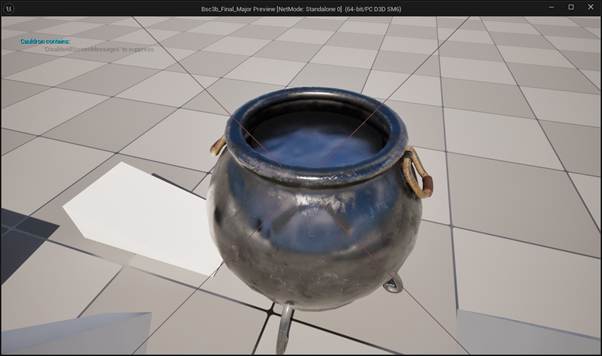
I’ve added a box as well to catch anything that falls inside, any potions that hit the bottom I want to add an impulse to fling out. I’ve added another function to bpi_brewingitem for ‘cauldron ejec’ which for BP_potion adds an impulse with velocity change ticked, with this added potions won’t get stuck in the cauldron.

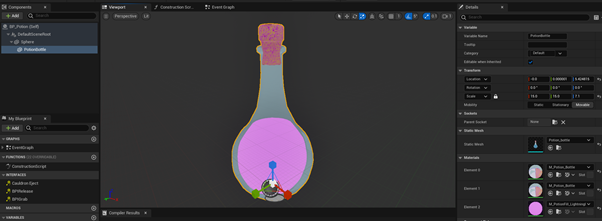
I’ve added a potion model that comes with separate materials for its different parts including the liquid inside, perfect for our application of filling the potion with a ‘volume’ where we can set material on index 2.
I’ve added a bellows model from sketchfab but this was mildly more complicated to set up, it came with an animation and imported as a skeleton rather than a mesh.
The bellows don’t trigger how I want, where they need to simulate being ‘grabbed’ like the brewing items except the player can’t actually move the transform, I want it to activate if the player holds LMB on the bellows then drag downwards. The hurdle is setting up this interaction to work when only the bellows are overlapped and clicked upon. I can use the brewing item interface but it’ll feed into the player’s holding item blueprint, trigger a reference set and enable tick event – If I add a return bool to BPI_Grab as ‘liftable’ we can check if the grabbable object can be picked up or not to filter whether or not the ref set and tick blueprint should run. After this, I now need to find a way to get the bellows actor to communicate with the cauldron as a child actor, main solution is adding yet another interface function to work as the trigger in place of the bellows overlap event, using ‘get parent actor’ to call this cauldron function should work.

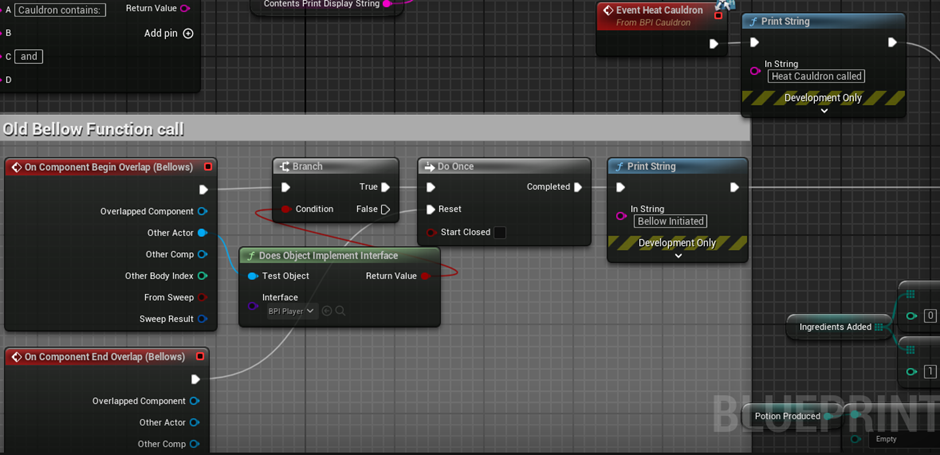
Bottom left is the old event trigger method, top right is the new one using an interface, much more clean and simple.
I realise I’m still missing a method to store or equip potions, I’m adding a shelf to work as a container for the potions that the player wants to take to battle. I’ll again be using an interface for this object to avoid repetitive casts. I’ll save an array of 3 vectors as three separate locations to hold the potions, alongside this I’ll also keep an enumerator array for the potion types we’ll store for later, within the blueprint interface function we can add a potion to the shelf with a blueprint fed through the input node, here we’ll get the potion enumerator to add to the shelf’s potion array, set the referred potion actor’s location to one of the predetermined spots, reset the rotation, tick a new bool to track if the potion is placed or not to prevent further interactions, set collision to physics only, turn off physics simulation before returning true or false in the return node.
To call the function for adding potions to the shelf, I have another branch checked on bp_potions overlap’s event to check for a potion shelf interface but only if cauldren check fails first.
I want to work on adding models for the herbs next, however I’m struggling to find suitable free asset. I’d like to create the models myself to create the exact shape I’m looking for. I want to create long cuboid-style assets that the player can ‘pluck’ out from the shelves. I also realise this may take a while too. I have some other minor but imporant parts to deal with such as a start screen, level house to battle, end screens for battle sequence. A pause and quit menu would be ideal too.
Throughout my research for similar games and inspirations, I came across a game called ‘War of the Wizards’ which is also infact a 1vs1 spellcasting game that revolves around drawing shapes to cast spells excpet their execution is miles better than mine and it’s fully in VR which is something I considered developing early on. Due to the similarity in both mechanics and name I realised it would be wise to change the name incase I choose to fully finish development of my game and release it. After brainstorming a couple of pun names, I settled with the name ‘Runes of engagement’ as a play on with words with ‘rules of engagement’. An art friend of mine Duke Whetherill was kind enough to create a 3D render for the game’s title card tough it’s a 2D image export as he’s a great visual artist at the cost of an extreme tri-count; making the 2D imagine cost substantially less.
Does a start menu count for needing to be diegetic? Diegetic start menus exist where the typically UI elements such as start and exist buttons can be implemented as 3D objects to become spatial and be masked as something thematically fitting like signposts. For the moment, I’m setting up a basic main menu and a door in the house level to access the arena.
On second thought, for the pause menu i’d like to make it another book on the player’s waist.


One interesting hurdle is that when I pause the game, the buttons can’t be highlighted, instead i’ll set the global time dilation extremely low so it’ll be slow like spellcasting.
TO DO NEXT: START AND ENDS FOR ARENA
10.05.25 Short moment work on pillars
I wanted to use my custom font for the health values projected by the pillars, they exist in the game space but lack a visual effect to make them feel visibly fitting enough in the game world.
I think a big crystal model would fit well for the pillar as they look like big tanks of fluid which I think feels more bio-punk than ‘magic’ – replacing the glass segment’s static mesh with a crystal model should be the only work as the health and damage chip part’s materials are additive meaning the overlapping parts of the crystal should be coloured in.
Hurdle with the custom font is that it needs to be a material, I can just duplicate unreal’s defaulttextmaterial however the font needs to be offline cached rather than runetime cached.
After looking further into the issue, it turns out you can double click font files to add them to windows, and in unreal engine you can select text files there when choosing ‘offline cache style’
The runelike text for letters looks great however the numbers look a bit too square, I found a separate font to use for my text renders that use exclusively numbers such as the pillar values.
I’m running a test cook and build to make sure it works as well as playtest for how the game feels as a final product.
It’s missing a lot of details such as any guidance or menus for the player, and there’s a lack of feedback as well for actions too such as if the player makes an invalid potion.
A large issue with looking for assets is finding ones that are fitting for my application, free and within reason for tri-counts. I’m certainly not going to find assets that are ‘perfect’ for my fantasy plant designs, likely what I can do is find plants that will be usable 3D-wise and modify the texture, eg stonecap mushroom I can edit the top to be grey, firebloom I can edit bulbs to have warm colours and glow etc. From trying to set up the other plants I’ve sourced I haven’t liked their outcome in engine, to simplify the process I’m going to use the one flower I’ve imported so far with a colour parameter and material instance per plant so they can atleast visually stand out from each other.
The ingredient data table structure only includes the name enumerator and static mesh, I need to add to the structure a transform variable to fix the rotation and scale of the models, and a material variable for the different materials I’ll be using per item.
Rocks: Scale 50, rotation red -90.
The material instances didn’t differ the plants enough, I opted to instead just re-use potion material instances to make them all differ.
The cauldron doesn’t give enough visual feedback to the player on the currently process. I have an idea to add a visual copy of the item floating in the cauldron top to represent it.
I’ve added two static meshes to the cauldron to represent the cauldron contents, updated when ingredients are added. While setting this up I also took the liberty of adding a switch to stop too many ingredients from being added, and return a success bool for the ingredients actors to use in a branch to prevent their life spans being set when not added to the cauldron.
I’ve sourced some textures to use the for the floor and walls, and a fantasy style table to place all our beautiful items on. From all these assets being included

I next want to add the missing diegetic pause menu, I’m going to give it two access methods, esc as a backup incase the player is stuck and a back mounted to the player.
Finding a suitable wizard model has been a frustrating process as well, many of the models I tried either broke when using Mixamo’s auto-rigger or simply failed to load. After a half dozen I finally got a model to load and export an animation only for all animations to fail to import due to a missing mesh. After another few models, I finally managed to get one to work.
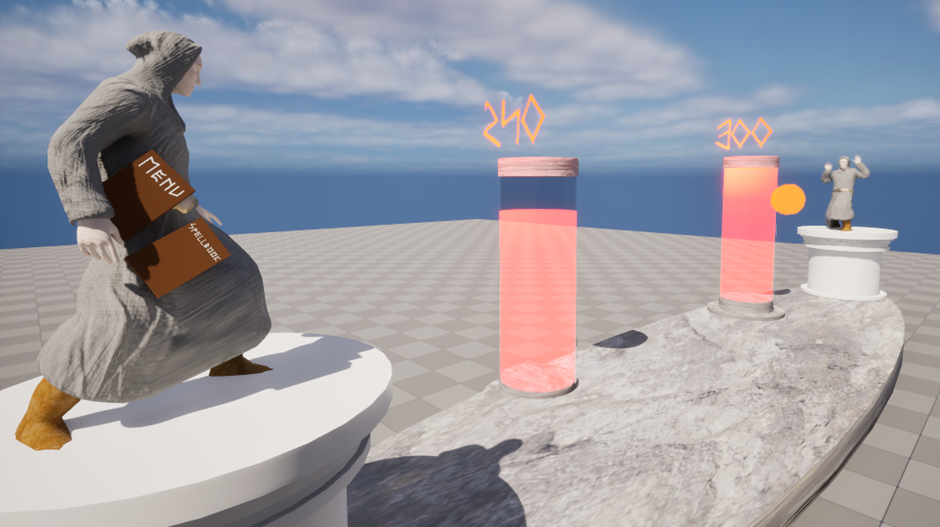
One extremely last minute tasks, i’ve added a book in the cauldron level to function as a hint for what the player must be.
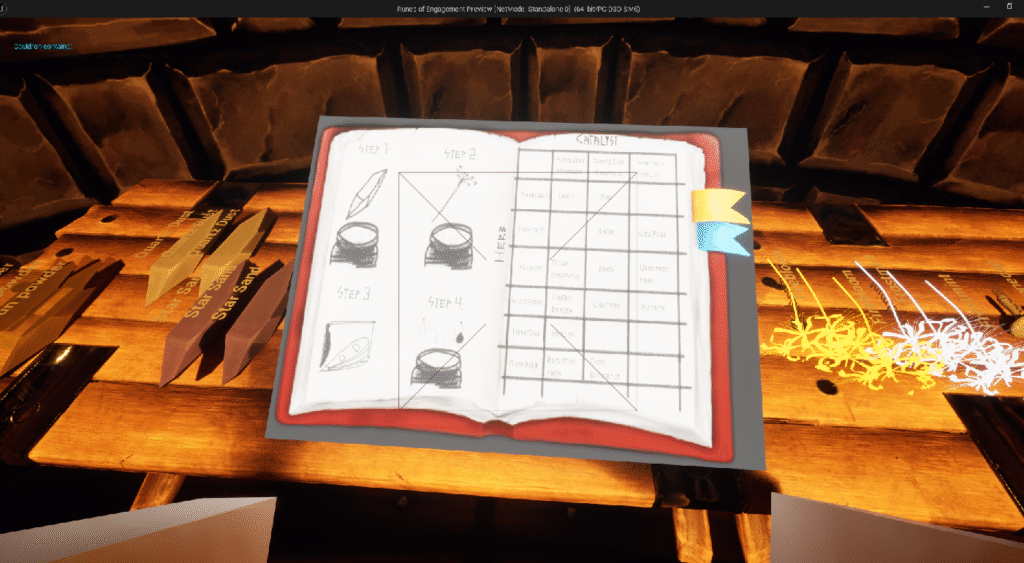
The block arms were the next thing I wanted to deal with, as they’re a very minimal screen element I thought i’d use a cylinder with a cloth material to present basic arms as a quick solution than finding a pair of arms online, as well as turn off the interaction box as well.

Last thing I need to give a bit of visual touch up is the arena
It always bugged me how the health bar is still a 3d bar and not a crystal so I fetched a model from skechfab which fit gorgeously. However, I thought the healthbar material was appearing only because of the additive setting overlay the origin glass section of the bar rather than its own cylinder static mesh,

i still like the addition of the crystal, I think i’ll keep it in place for now and move onto adding the trees i found on sketchfab.
I’m slowly starting to not like using free-asset librarys.
The log required 51 materials to be applied individually and didn’t look right in the end, and the trees I found all came as part of a giant asset set which would be perfect if they were all one static mesh
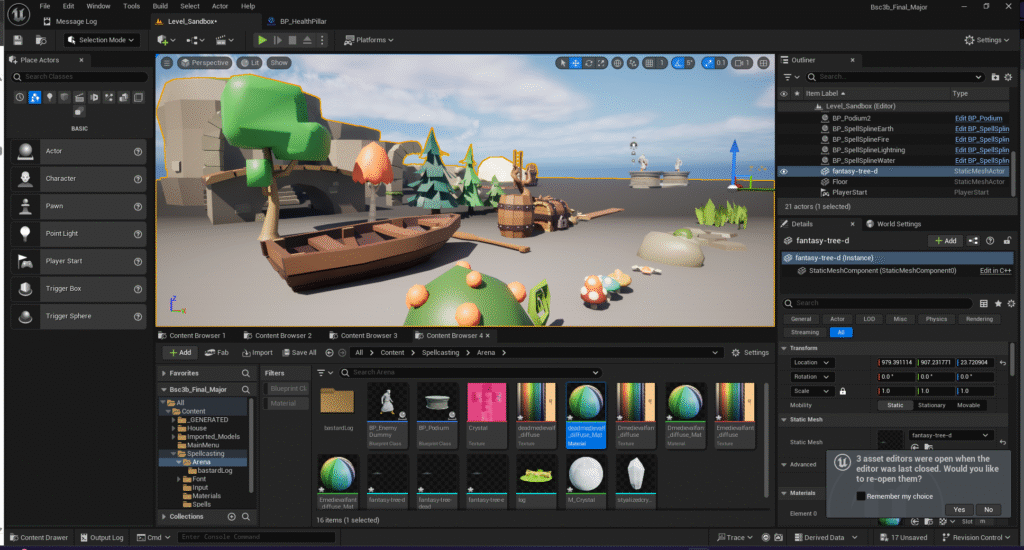
Im gonna call it for visuals here and just finally add a victory screen.
As a workaround for such a barebones arena, i’ve added a local fog volume to hide how barren the area is. I think it fits the setting and keeps the player focused on the fight.
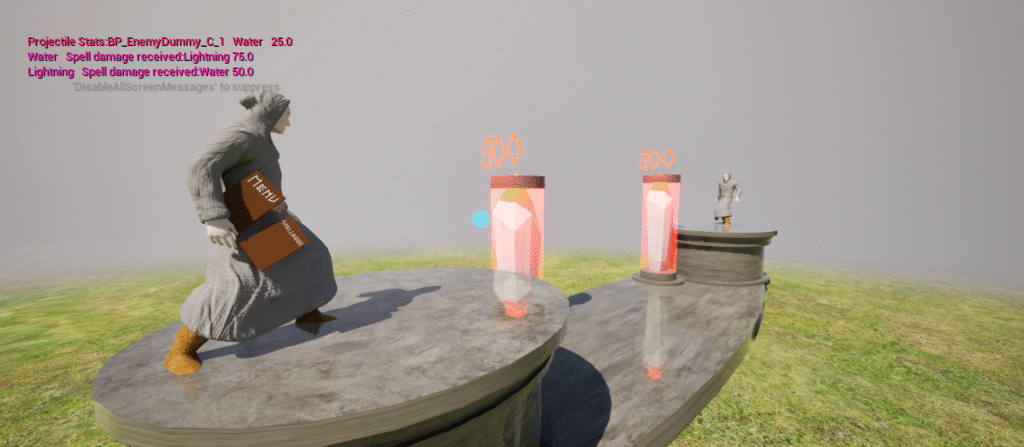
Last steps was adding an end sequence, I’ve added a victory screen that fades and loads the house again, and a fade for loading into the arena.
I’ve repurposed this fade to also run when the player uses the menu book to return home

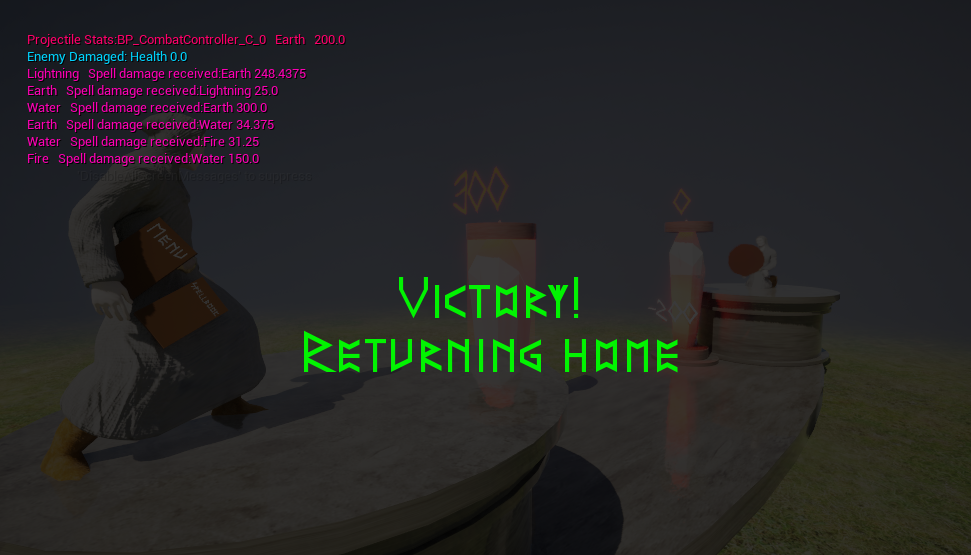
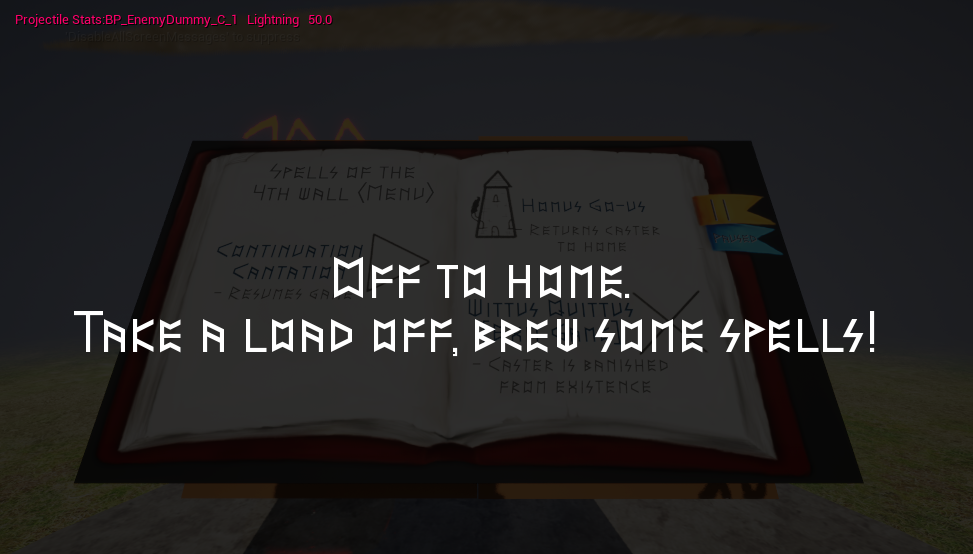
This dev blog overall has been quite spotty, often just spilling thoughts and recording snippets of what I’m thinking about and working on rather than structure criticism, reflection and evaluation.